Compare 9 AI Legal Research Tools With a Buyer’s Checklist
By Emily Fenton
Updated November 18, 2026

When comparing AI legal research tools, start with your firm’s existing research subscription. CoCounsel Legal bundles Westlaw Advantage, and LexisNexis offers Lexis+ with Protégé. Check what your contract includes. Use the checklist to compare nine tools on the sources and jurisdictions they cover, how they check citations and whether they publish prices.
Legal disclaimer. We are not lawyers. This article is for general information and does not provide legal advice. Consult your legal advisor before making any legal decision.
View the primary-source illustration

Contents
- By reader · What counts as research · Buyer’s checklist
- Comparison table · Nine tool profiles · Older research tools · Contract review and e-discovery
- Court and agency alerts · Citation workflow · FAQ · Before you buy
Find your starting point
| Your situation | Where to start and what to check |
|---|---|
| Litigator checking case law and citations | Read this section Compare the nine tools · What matters most for you Primary law coverage, citation checking |
| Solo or small firm choosing a first paid tool | Read this section Use the buyer’s checklist · What matters most for you Pricing transparency, documented coverage |
| In-house counsel or compliance lead | Read this section Track court and agency pages · What matters most for you Regulators and legislatures as well as case law |
| Law librarian evaluating a renewal | Read this section What happened to Casetext, ROSS, Fastcase and vLex · What matters most for you Ownership changes and jurisdiction coverage |
What counts as an AI legal research tool
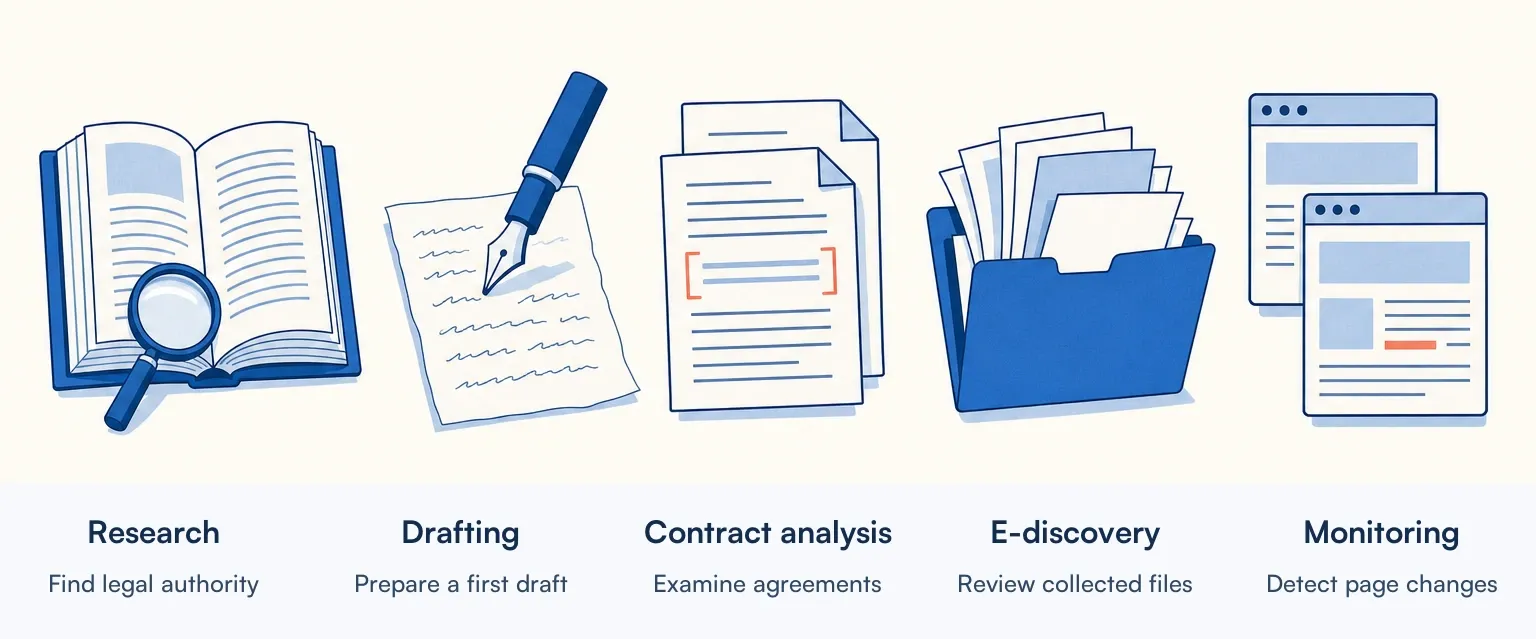
This guide separates legal AI into five jobs. Mix them up and you risk licensing a tool built for another job.
Legal research answers a question of law from primary and secondary sources: case law, statutes, regulations and treatises. Our guide to legal research tools covers research platforms more broadly. Drafting produces briefs, motions, contracts and correspondence. Research products such as Lexis+ with Protégé and CoCounsel Legal include drafting. Before you rely on any drafting tool, ask which sources it checks its citations against.
Contract analysis extracts terms and obligations from agreements your organisation already holds and flags where they depart from a standard. E-discovery processes collected documents in litigation or an investigation. Change monitoring checks a web page you choose on a schedule and flags detected changes. A person decides whether a change matters legally.
Each job comes with its own buying questions. Buy for the job you do most. If you need to follow changes to agency rules, compare regulatory tracking software.
A checklist for choosing a legal AI tool
This is a desk comparison of public documentation. It was first researched on 6 and 7 September 2026, and every vendor entry was rechecked against vendor pages and other primary sources on 18 November 2026. We did not test the products hands-on: no controlled benchmarks, no timed workflows, no output scored against an answer key and no review of customer contracts. The capabilities in this guide are what each vendor documents. Prices, jurisdiction lists and plan contents can change after the check date, so confirm them with the vendor before you buy.
Ask each vendor these four questions.
- Which primary sources can I search? Ask which case law, statutes and regulations the tool covers and whether they come directly from courts and legislatures, from a publisher’s collection or from both.
- Does it cover my courts and dates? Ask for the coverage list for your courts, countries, source types and date ranges. That matters for US state courts as much as for other countries.
- Which citation checks can I run? Does the cited authority exist, does it support the proposition in the draft, and is it still good law? A citator such as Shepard's helps answer the third by tracking later treatment. Ask each vendor to show which of the three its product handles.
- Can I see what my firm would pay? Check whether the vendor publishes a price for the package you need, offers it for purchase online or asks you to contact sales.
If a point could not be established from vendor documentation, the table tells you what to ask the vendor.
Disclosure: Visualping is our product. It checks web pages you choose, including public pages that publish opinions, rules or statutes, and flags detected changes. We include it here for teams that need to watch those pages. Our section on court and agency alerts explains its limits. Visualping has no searchable database of legal authority or citator.
If your firm already uses Westlaw or Lexis, start with CoCounsel Legal or Lexis+ with Protégé. For research across countries, check Vincent by Clio’s coverage for your jurisdictions. For a brief you have already drafted, look at Clearbrief’s citation-checking features.
Compare legal research coverage and pricing
| Tool | Coverage, citation checks and pricing |
|---|---|
| CoCounsel Legal | Maker Thomson Reuters · Primary law corpus Westlaw Advantage and Practical Law, sold as one bundle · Jurisdictions US package documented; international research depends on the subscription · Citation checking KeyCite flags included · Public pricing Online plans for US firms with up to 10 lawyers; larger firms contact sales |
| Lexis+ with Protégé | Maker LexisNexis · Primary law corpus Lexis primary and secondary content; some workflows add web and firm documents · Jurisdictions Varies by country and package · Citation checking Shepard's · Public pricing US Protégé quote by firm size and needs; base Lexis packages sold online |
| Vincent by Clio (formerly vLex Vincent) | Maker Clio · Primary law corpus vLex library of over one billion documents across 110 jurisdictions, per Clio's 2025 acquisition announcement · Jurisdictions Varies by workflow; list includes the US, UK, EU and other named countries · Citation checking Links cited authorities and shows judicial treatment · Public pricing Pricing on request |
| Bloomberg Law AI Assistant | Maker Bloomberg Industry Group · Primary law corpus Bloomberg Law content; dockets are a separate platform service · Jurisdictions US legal and docket resources documented; confirm other coverage · Citation checking BCITE court-opinion citator, a separate Bloomberg Law tool · Public pricing Demo request; ask for a price |
| Paxton AI | Maker Paxton · Primary law corpus US federal and state laws and regulations, appellate case law · Jurisdictions US · Citation checking AI citator · Public pricing Individual plan: US$499 per user per month or US$2,999 per user per year |
| Alexi | Maker Alexi · Primary law corpus US and Canadian law · Jurisdictions US and Canada · Citation checking Cited-source verification; ask about later treatment · Public pricing Priced by firm size and deployment |
| Midpage | Maker Midpage · Primary law corpus US case law, US Code, CFR, and statutes and regulations of all 50 states · Jurisdictions US · Citation checking Citator signals · Public pricing Professional plan: US$100 per month for one seat, billed monthly |
| Clearbrief | Maker Clearbrief · Primary law corpus Your draft and record; cited law shown through Lexis or Fastcase/vLex · Jurisdictions US law sources; confirm your court · Citation checking Checks cited law and record support in Word · Public pricing Solo price listed; custom pricing for larger firms |
| Harvey | Maker Harvey · Primary law corpus US case law and regional sources such as Norwegian legislation and Indian legal content · Jurisdictions Varies by jurisdiction and source · Citation checking Shepard's in the Ask LexisNexis workflow for US primary law · Public pricing Demo request; ask for a price |
Every entry summarises the vendor's own documentation, prices included, as checked on 18 November 2026. Nothing in the table comes from hands-on testing, so treat it as a starting point for your own trial.
Build your shortlist from nine legal research tools
CoCounsel Legal
Thomson Reuters sells CoCounsel Legal as a bundle of Westlaw Advantage, Practical Law Dynamic Tool Set and CoCounsel Essentials for research, analysis and drafting, with KeyCite flags included. CoCounsel began as a Casetext product, and Thomson Reuters bought Casetext in 2023.
Best for: firms that research in Westlaw and want the AI assistant, the research platform and the KeyCite citator in one package.
Limitations: the US site offers online plans to firms with up to 10 lawyers and sends larger firms to sales. International research depends on the subscription: Thomson Reuters says CoCounsel's international research section may offer more than 20 jurisdictions, and availability differs by workflow. If you already subscribe to Westlaw, check whether your contract includes CoCounsel before assuming it does.
Lexis+ with Protégé
LexisNexis describes Lexis+ with Protégé as covering research, drafting and analysis over Lexis primary and secondary content, with Shepard's for citation treatment. Some workflows can also draw on web sources and your organisation's own documents.
Best for: firms whose research and citation checking already run through Lexis+ and Shepard's.
Limitations: in the US, LexisNexis quotes by firm size and requirements, and the published price of a base Lexis+ plan does not tell you what Protégé costs. US small firms can buy base Lexis packages online, and LexisNexis Australia publishes configurable small-firm pricing. The Lexis content Protégé can search depends on your plan, and content rights vary by country.
Vincent by Clio (formerly vLex Vincent)
Clio completed its US$1 billion acquisition of vLex on 10 November 2025, and its announcement described a vLex library of more than one billion editorially enriched documents across 110 jurisdictions. That figure covers the whole library. Vincent's coverage differs by research workflow, and vLex publishes a coverage list by jurisdiction that includes the US, the UK, the EU and other named countries. Clio says Vincent cites the authorities behind its answers and shows judicial treatment.
Best for: practices researching the law of several countries, once they have confirmed that the jurisdictions they need appear on Vincent's coverage list.
Limitations: pricing is on request. A jurisdiction in the vLex library may be missing from a given Vincent workflow, so ask which workflows cover your jurisdictions. Vincent now belongs to a practice-management company; if you keep research and practice management with separate vendors, ask which Vincent workflows you can buy on their own.
Coverage check. Pick a case from a court you use regularly. Ask the vendor to find the opinion, open it and show how a later court treated it. Record which steps your proposed subscription covers.
Bloomberg Law AI Assistant
Bloomberg Law describes an AI Assistant that answers from Bloomberg Law content and links to its sources. The platform also has BCITE, a separate citator for court opinions, and a docket service that lets you track dockets and receive alerts.
Best for: teams that already research and track dockets in Bloomberg Law.
Limitations: Bloomberg documents US legal and docket resources, so confirm coverage for other countries. The assistant sits inside Bloomberg Law's subscription research platform, and the site asks you to request a demo, so access and price come down to your agreement. Ask which sources the assistant retrieves from, and whether its answers include a BCITE check or you run that separately.
Paxton AI
Paxton markets AI to litigation teams for research, work on matter documents and drafting. Its help documentation describes US federal and state laws and regulations and US case law from the appellate courts up, and Paxton documents an AI citator that interprets a case's standing. Its pricing page lists an individual plan at US$499 per user per month or US$2,999 per user per year, alongside firm plans and a trial.
Best for: litigation teams, including individual lawyers who want to see a price before talking to sales.
Limitations: documented case law coverage starts at the appellate level, so check how Paxton handles trial-court opinions if your matters rely on them. The citator is Paxton's own; test its treatment calls against a citator you already trust during the trial.
Alexi
Alexi's FAQ describes research memos, drafting and verification of cited sources, with coverage of US and Canadian legal jurisdictions.
Best for: teams whose research crosses US and Canadian law.
Limitations: Alexi prices by firm size and deployment, so you need a conversation to get a number. Ask which collections it covers for your courts, and ask it to show how it flags a case that later courts treated negatively.
What to bring to a demo
| If your shortlist depends on… | Ask the vendor to show you… |
|---|---|
| Coverage in a second jurisdiction | The same research workflow in both jurisdictions, using a public case you choose from each. |
| The cost for your team | A written quote for your seat count that includes the sources and citation checks you just saw. |
Midpage
Midpage offers legal research and drafting. Its data FAQ lists US case law, the US Code, the Code of Federal Regulations, and the statutes and regulations of all 50 states, drawn from government and court sources, with citator signals. Its Professional plan is listed at US$100 per month for one seat, billed monthly; other plans are priced differently.
Best for: teams that want US research and drafting in one product at a published per-seat price.
Limitations: the documented coverage is US law, and the citator signals are Midpage's own, so compare them against an established citator during a trial.
Clearbrief
Clearbrief works in Word on a draft you have already written, checking the cited law and the record against what the text says. It can display cited law through Lexis for customers who subscribe to both, or through Fastcase and vLex without a separate subscription.
Best for: any team whose actual failure mode is a citation that does not say what the brief says it says.
Limitations: checking that a citation supports your text is a different question from whether the case is still good law, so ask whether you need a separate citator for your jurisdiction. Clearbrief lists a solo price; larger firms get custom pricing.
Harvey
Harvey sells to large law firms and professional-services organisations, and says its agents inherit the context of the matter or project they open in.
Best for: large firms running a formal evaluation with vendor support.
Limitations: Harvey lists its knowledge sources, including US case law, Norwegian legislation and Indian legal content, and which of them your firm can use depends on its deployment. For US primary law, Harvey's Ask LexisNexis workflow includes Shepard's signals. For other workflows and countries, ask the vendor to demonstrate how it treats a case that was later overturned. Pricing depends on the deployment, and Harvey's site routes buyers to a demo request.
What happened to older legal research tools
ROSS, Casetext, Fastcase and vLex have each closed or changed owners, in different ways. The difference matters when you are deciding whether a contract transfers, a product continues, or a workflow has to be rebuilt.
ROSS Intelligence shut down. In an announcement dated 11 December 2020, its founders said the company was closing operations and the platform would be unavailable as of 31 January 2021. A list that still presents ROSS as a current option is out of date.
Casetext was acquired. Thomson Reuters announced on 17 August 2023 that it had closed its acquisition of Casetext for $650 million in cash. CoCounsel, originally a Casetext product, continues under Thomson Reuters, and the Casetext homepage now redirects to Thomson Reuters' CoCounsel.
Fastcase and vLex both moved under Clio. The Fastcase site describes Fastcase as part of Clio, and Clio completed its US$1 billion acquisition of vLex on 10 November 2025, which brought Vincent into the same group.
Before you renew. Which AI features does your current research contract already include? Which independent products do you want to trial against them?
Avoid mixing legal research with contract review or e-discovery
Two categories sit next to legal research and answer different questions.
Contract analysis tools read agreements your organisation already holds and pull out terms, obligations and departures from a standard. Luminance and Litera's Kira both review contracts and extract terms across a set of agreements.
E-discovery platforms such as Everlaw and Relativity process and review documents collected in litigation and investigations. That is a different problem from researching a point of law.
If your shortlist mixes these with research platforms, split it before you take demos, because each group needs its own evaluation criteria.
Track changes to court and agency pages
Research platforms answer questions about the law. A separate question is whether a specific page has changed since you last looked at it: a court's local rules, a state agency's guidance page, a licensing board's status list, a bill's page on a legislature site. If bills are your main source, compare legislative tracking software.
Each research platform has its own alerts. Westlaw supports saved-search and KeyCite alerts, Lexis supports alerts on searches and Shepardized citations, and Bloomberg Law can alert you to filings on a docket you track. For material those platforms carry, their alerts are the obvious first choice. They can only cover what the platform collects. Before you count on them for a county court's fee schedule, a regulator's FAQ page or a state board's notice page, check whether your platform carries that page at all.
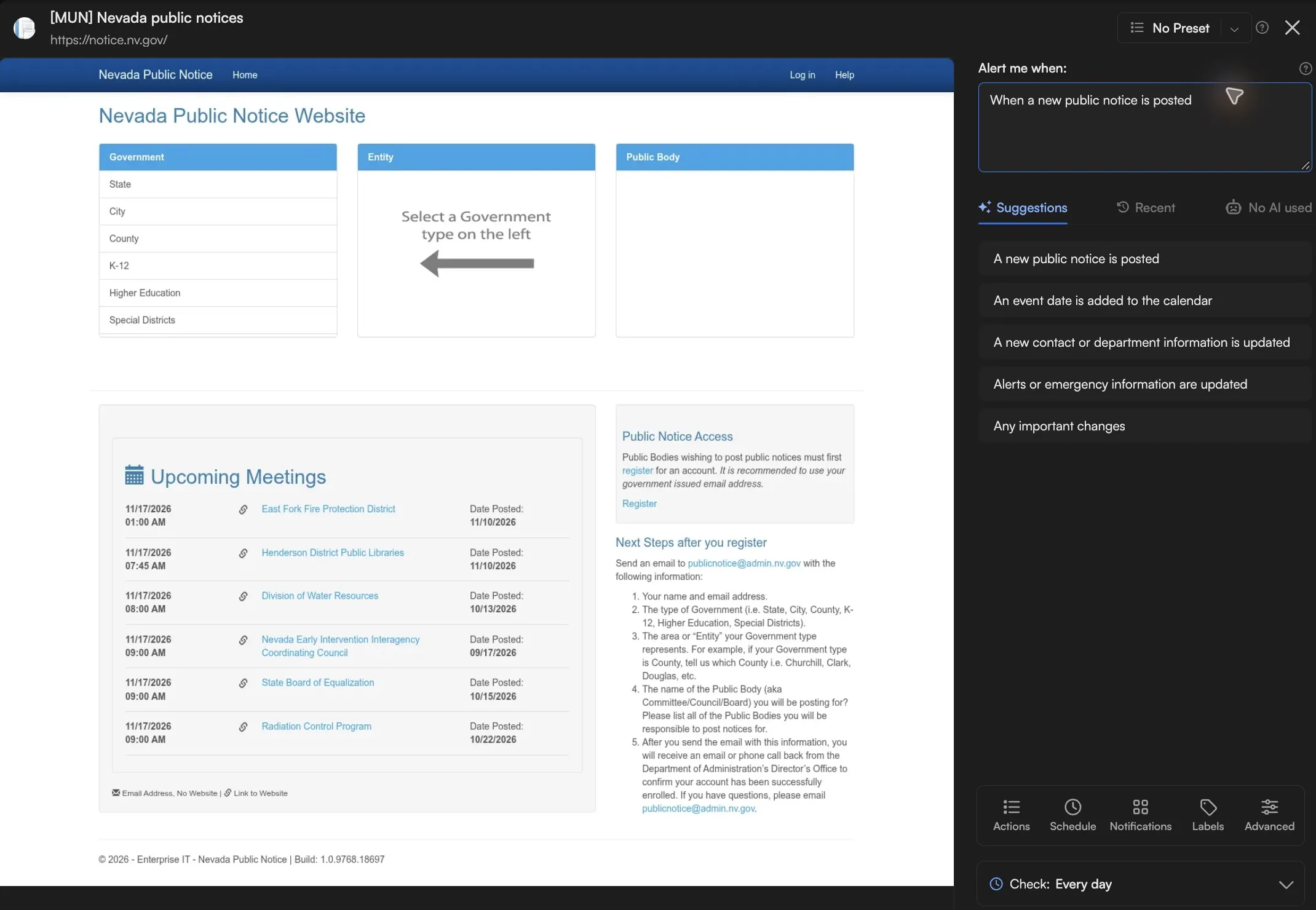
Change monitoring covers pages like those. In Visualping, you choose a page and a check frequency, and the frequencies available depend on your plan. When a check captures the page and detects a change that meets your alert settings, Visualping alerts you, and you can open a highlighted comparison of what changed. The alert email shows up to five blocks of changed text, so open the comparison to see all of them. Whether a change matters legally is a judgment that stays with you.
For help selecting sources and configuring alerts, see our guide to legal and regulatory monitoring.
The screenshots in this section come from a Visualping demo monitor on Nevada's public notice website, notice.nv.gov, set to check every day for new public notices.
A snapshot of Visualping's own monitoring data, taken on 7 September 2026, counted 13,573 active monitor jobs on court, legislature and federal rulemaking pages, identified by their URLs, with 1,948 distinct owner keys. Across the sample, 44% of jobs had a last detected change in the preceding 90 days. By category, that figure was 69% of the 248 federal rulemaking jobs, 46% of the 10,991 court jobs and 32% of the 2,334 legislature jobs. About four in five jobs were configured to check between hourly and daily.
The snapshot also contained 3,461 jobs with no recorded last-detection timestamp. A missing timestamp does not show that a page never changed, and a last-detection timestamp alone cannot tell you how often a source changes. Choose each monitor's schedule according to the deadline your team needs to meet.
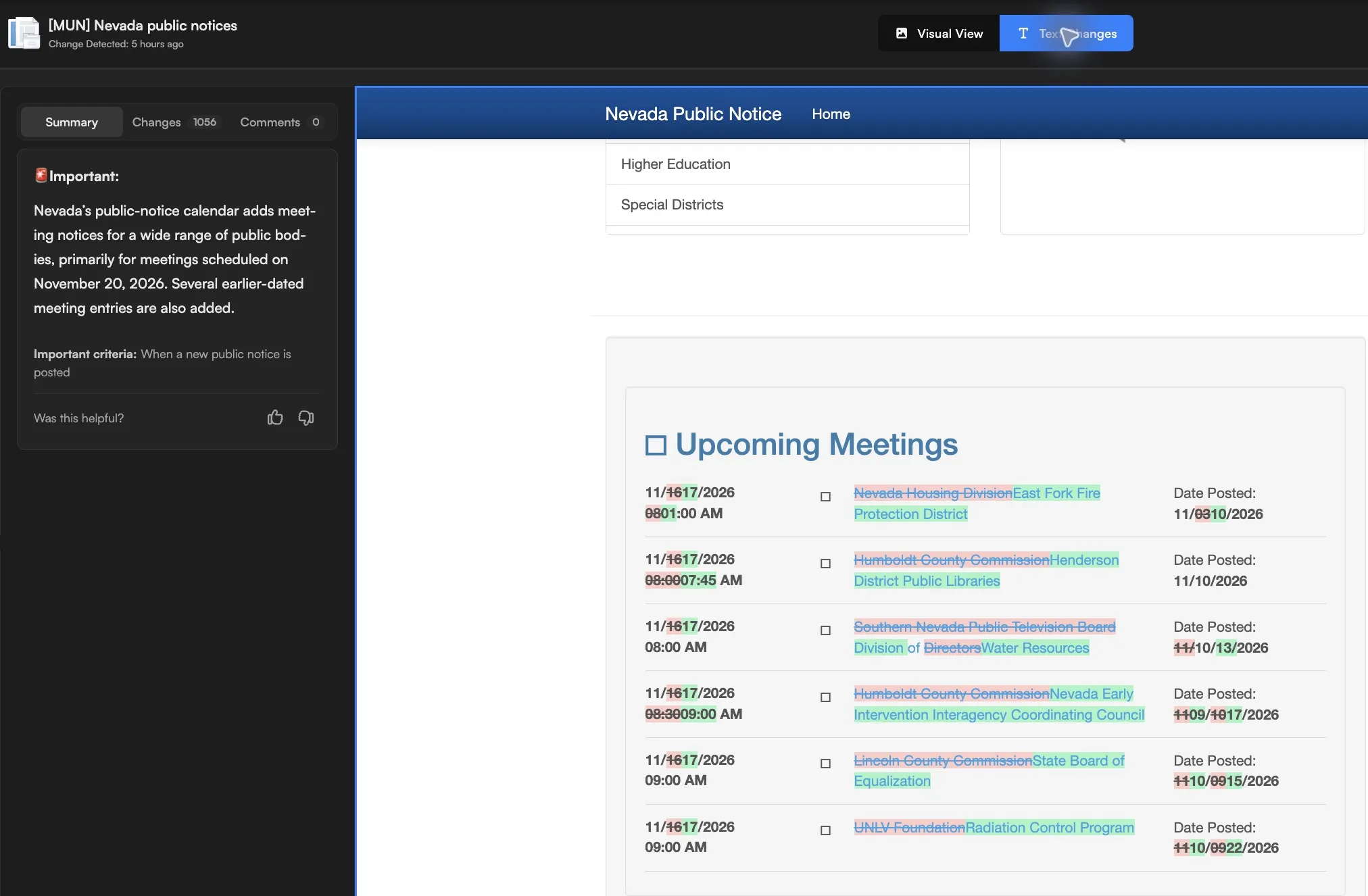
In the alert below, the demo monitor picked up new meeting notices on the Nevada page and marked the change Important under its criteria. Deciding what any of those notices means for a client stays with the lawyer.
Visualping's limitations for legal work: it monitors pages you select and has no legal research database or citator, so finding authority and checking its current treatment stay with a research platform. It does not tell you whether a change is legally significant. For a login-protected page, credentialed monitoring needs setup: configure the sign-in steps and check a test capture before relying on the monitor.
A workflow for checking AI legal research citations
Fabricated citations have already led to sanctions, so build the checking into the workflow before anyone files.
In Garner v. Kadince, 2025 UT App 80, filed 22 May 2025, the Utah Court of Appeals sanctioned petitioner's counsel under rule 40 of the Utah Rules of Appellate Procedure. Opposing counsel had flagged problems with the authorities cited in the petition, and one of the cited cases, generated by ChatGPT, did not exist.
On the ethics side, the American Bar Association's Standing Committee on Ethics and Professional Responsibility issued Formal Opinion 512 on 29 July 2024. It explains how the ABA Model Rules apply when lawyers use generative AI and discusses competence, confidentiality, client communication, candor, supervision and fees. An ABA formal opinion is guidance. Check which professional-conduct rules govern the matter and any court rules or orders that govern the filing. Some judges address AI in their own standing orders, such as this civil standing order from a US district judge.
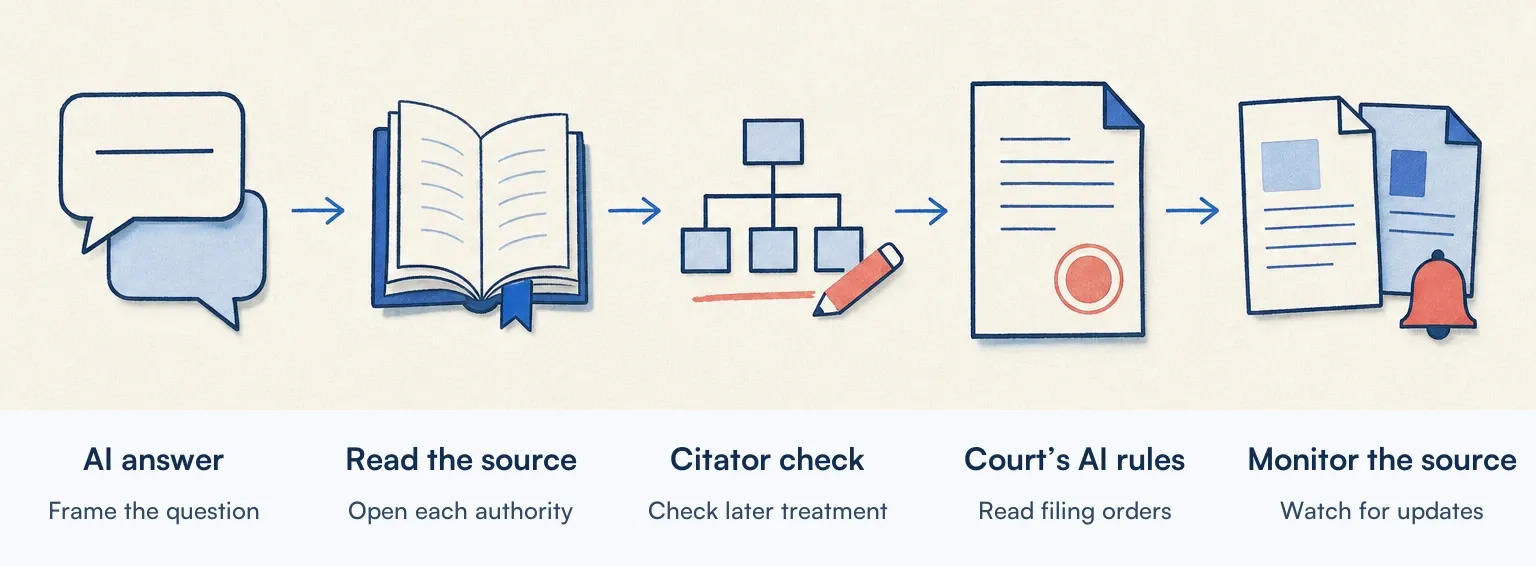
A workable sequence for a firm adopting one of these tools:
- Use the AI answer only as a starting point for the research question.
- Open every cited authority in an official court or legislature publication or a reliable research database, and confirm the passage says what the tool claims it says.
- Run each case through a citator to check its later treatment, and read the later cases that matter. Whether a case exists and whether it is still good law are separate checks.
- Read the filing court's local rules and any standing order that applies, including any requirement to disclose AI use.
- Watch the source pages whose changes would affect your advice, and verify the current rule before advising a client. For judicial decisions, see how to monitor court orders and opinions.
Frequently asked questions
Can you use AI for legal research? Yes. Thomson Reuters, LexisNexis, Bloomberg Law and Clio all sell AI research assistants. Before an answer reaches a filing or a client, read the cited authorities and check their later treatment. Your professional conduct rules and any applicable court orders apply to AI-assisted work too.
Is there a legal version of ChatGPT? Yes. OpenAI introduced Astra for Law on 17 September 2026 and updated it on 17 November 2026. It searches a dedicated index of US case law, statutes, rules and other legal material, and OpenAI limits access to approved Enterprise and API workspaces, for lawyers and the people they supervise. As with any assistant, read the original authority and check its later treatment before relying on an answer.
Is Claude or ChatGPT better for lawyers? Compare how each is set up: which legal sources it can search, whether a citator is connected, and how your firm checks the output. Both can be connected to legal sources. Paxton offers its research and citator inside Claude or ChatGPT, and Free Law Project has made CourtListener's case law and citation analysis available in Claude. For anything you file, read the underlying authority and check its current treatment, whichever assistant you used. This guide did not compare the two directly.
Is there a free alternative to Westlaw? For US case law, Free Law Project's CourtListener provides free access to US court opinions, and some state judiciaries publish their own, including Utah Courts' appellate opinions and the New York Official Reports. CourtListener also maps which opinions cite which. A citation link does not tell you how the citing court treated the case, so verify an authority's current treatment before relying on it.
Which AI tool is best for legal research? That depends on what your firm already uses, and this guide did not test the tools head to head. If you research in Westlaw or Lexis, start by finding out what CoCounsel Legal or Protégé would add to your contract. Practices that research several countries should check Vincent's coverage list. Teams whose main problem is citation accuracy in briefs should look at Clearbrief.
Check your current research subscription before you buy
If your firm already researches in Westlaw or Lexis, find out what its AI assistant would add to your current contract before you buy anything new. If you have no incumbent platform, trial your shortlist on public or properly authorised material, review your confidentiality and data-handling obligations before you upload anything, and check the citations by hand throughout. Whichever platform you choose, list the source pages whose changes would alter your advice, starting with the ten your team checks most often. Check which of them your research platform already alerts you to, and put the rest on a monitor.
For a watchlist that spans several agencies, see how to track multiple regulatory websites.
Emily Fenton
Emily was the Product Marketing Manager at Visualping. She has a degree in English Literature and a Masters in Management.
More articles by Emily Fenton