How to Set Up Craigslist Alerts for New Listings
By Emily Fenton
Updated November 17, 2026

Craigslist alerts come in two kinds. Craigslist's own search alerts email you when a saved search has new results, and they come with a Craigslist account. A page monitor such as Visualping loads a search page on a schedule you choose, such as every 6 hours on the Free plan, and emails you a screenshot of what changed. Start with the built-in alert. Add a monitor when you want checks at set times or an alert outside email.
Which one fits:
| If you want | Use |
|---|---|
| An email when new posts match your search | Craigslist search alerts, included with a Craigslist account |
| Checks at set times, or alerts in Telegram | A Visualping page monitor, free for up to 5 pages |
| A backup in case one alert misses a post | Both, on the same search |
Turn on Craigslist search alerts
The built-in Craigslist alerts are called search alerts. Craigslist describes them as "emails that are automatically sent when a saved search has new results." You manage them from your Craigslist account, so the first step is to log in.
- Log in to your Craigslist account. Saved searches and alerts are account features.
- Run the search you want to repeat. Pick the city and category, type your keywords and set your filters.
- Save the search. Craigslist's help page tells you to click the "save search" link near the top right of the results page. On the results page we loaded on November 17, 2026, that control is a bell button labelled "save this search", at the right end of the search bar, next to the search button.
 The bell button at the right end of the Craigslist search bar saves the search. Captured November 17, 2026, inside Visualping's page preview.
- Open your account and go to the searches tab, where your saved searches are listed.
- Tick the box in the "alert" column beside the search. Craigslist sends a welcome email, and after that an alert email when the search has new results.
What to expect from Craigslist alert emails
Craigslist's search alerts help page sets out how the emails behave:
- Each email shows up to 20 results, most recent first, whatever sort order the saved search uses.
- Alerts include renewed, reposted and edited posts that now match the search, so a listing you have seen before can reappear.
- Craigslist publishes no fixed timetable. How often it runs the search depends on how many results the last alert had, and fewer results mean more frequent searches.
- A search containing the "&" symbol only uses the text before it. Craigslist suggests boolean search terms in its place.
- Saved searches cannot be edited. To change one, create a new search and delete the old one.
Keep the search narrow. Craigslist runs a saved search more often when its last alert had fewer results, and each email shows at most 20.
To stop an alert, click "Unsubscribe from this alert" in any alert email. You can also un-check the alert column or delete the saved search in your account.
When to add a page monitor to Craigslist alerts
Add a page monitor in three cases: you want the search checked at set times, you want a screenshot of what changed, or you want the alert outside email. The built-in alert covers the main job, and it comes from the site that holds the listings. A page monitor is a second tool that works another way. It loads the public search page on a schedule, compares it with the previous check, and sends you what changed. It replaces tracking Craigslist ads by hand, the daily habit of reopening the same search.
A Visualping page monitor on a Craigslist search page checks on a schedule you set, such as every 6 hours or once a day. You tell it what counts by typing a condition in the Alert me when box, and Visualping AI marks each change that matches as important. A new monitor emails you only the important changes unless you switch that setting off.
The email shows the page: a screenshot with the change highlighted, plus a short AI summary. The alert can also go somewhere other than your inbox. Telegram alerts are on the Free plan, and text alerts to US and Canadian numbers start on the $25 a month plan, billed annually.
Read Craigslist's terms of use before you add a monitor. Under them, users agree not to use software or services that interact with the site, apart from Craigslist's app, web browsers and email clients, unless Craigslist has licensed them. The same terms bar collecting Craigslist content with robots, scripts, scrapers or crawlers. Craigslist's own search alerts are the supported route, so set those up first.
Set up a Craigslist page monitor with Visualping
A monitor gives you a second source of Craigslist alerts on the same search. The Free plan covers 5 pages, and one Craigslist search is one page. To set up Craigslist monitoring for one search:
- On Craigslist, run your search, set the filters and sort by newest. Copy the full address from your browser's address bar. The city, category, keywords and sort order are all stored in that URL.
- Paste the URL into the box at visualping.io and click Go. A preview of the Craigslist page loads, so you can confirm the results are the ones you expect.
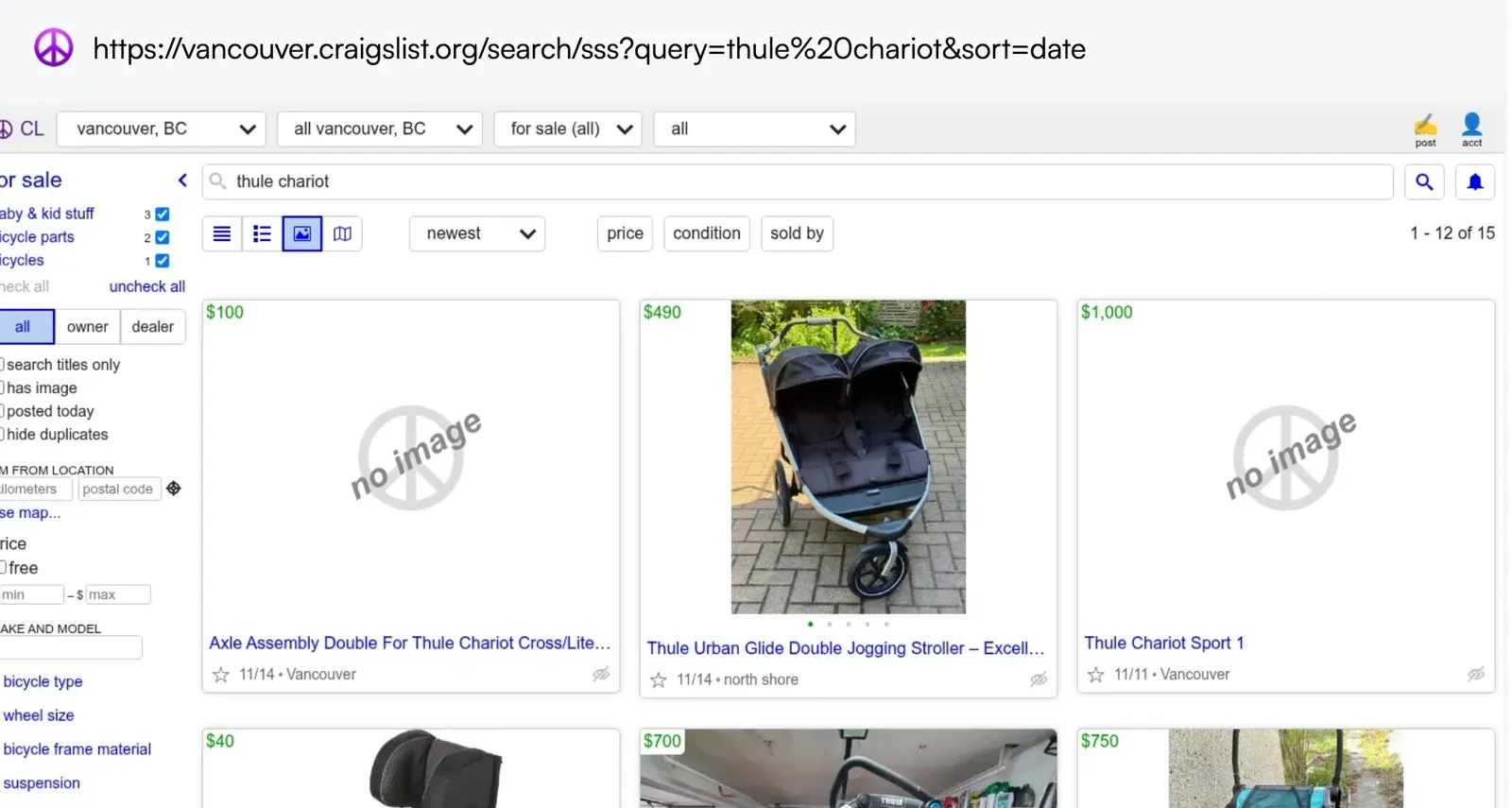 The Visualping URL box with a Craigslist Vancouver search for "thule chariot", and the page preview it loaded.
- In the Alert me when box, type the change you care about, such as "A new Thule Chariot listing appears", or pick one of the suggestions listed under the box.
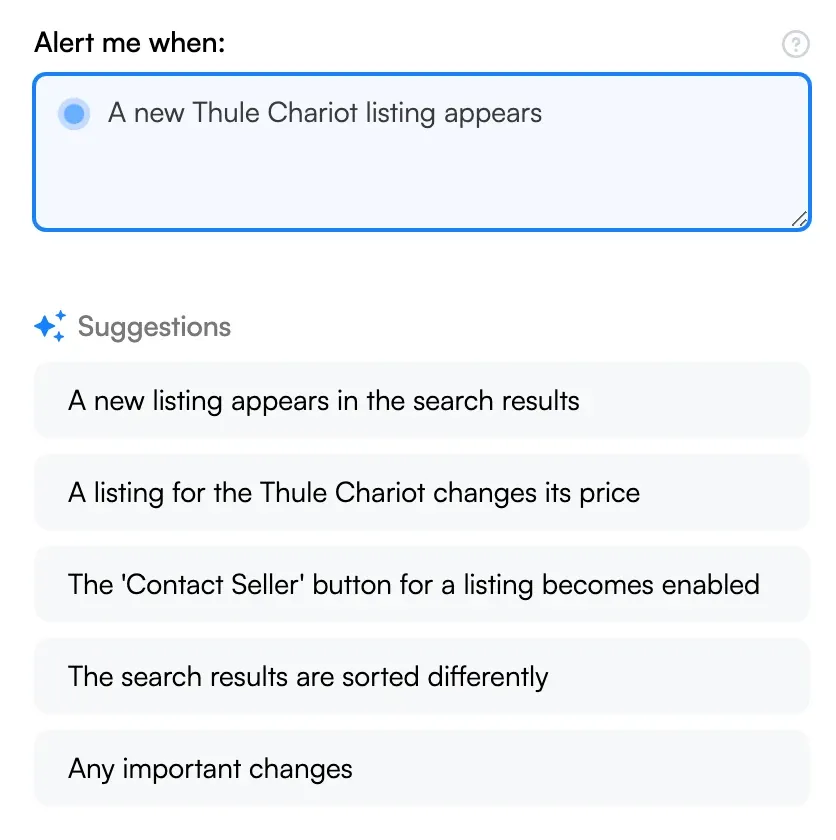 The Alert me when box with a typed condition, and the suggestions Visualping offered for this page.
- Open the Check menu and pick how often Visualping loads the page. The menu opens on Every day. On the Free plan, Every 6 hours also fits one search page.
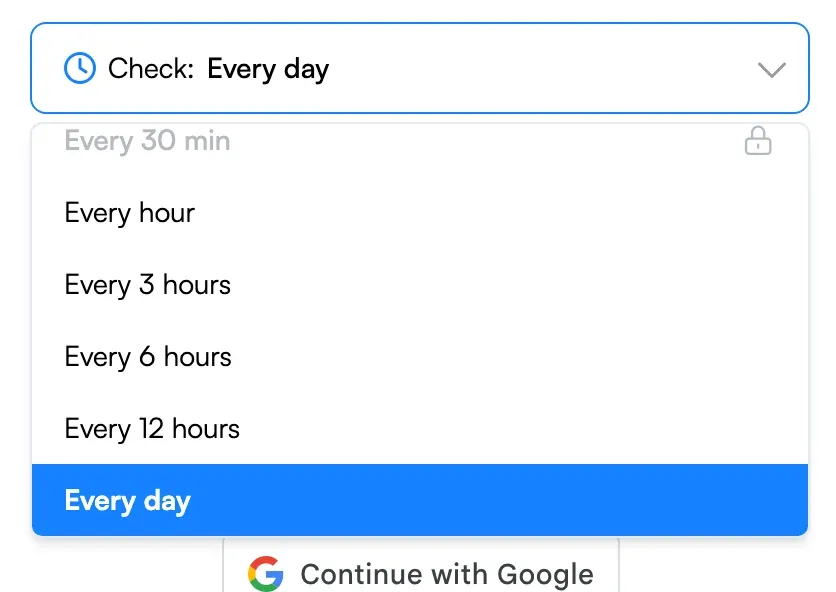 The Check menu, open to the frequency options.
- Type your email in the Send to box and click Start Free Monitoring, or use Continue with Google. Visualping emails you a verification message. Confirm your address to finish creating the free account.
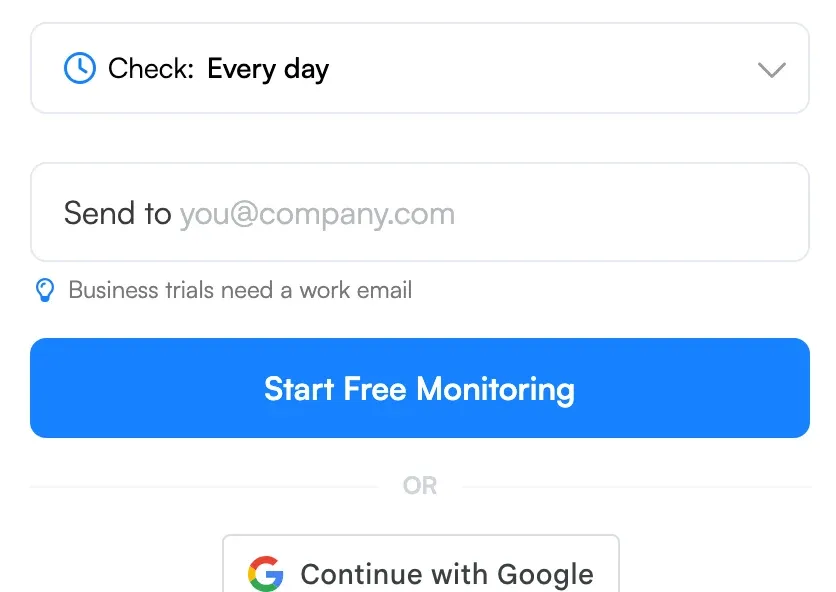 The Send to box and the Start Free Monitoring button.
When the page changes in the way you described, the alert email shows what moved. Open Craigslist from there and message the seller.
We ran these steps on November 17, 2026, with a Craigslist Vancouver search for "thule chariot", sorted by newest. The preview loaded the results page, which counted 15 matching posts and showed a price on each listing card, and the screenshots above come from that run. The search comes from the first version of this guide. In 2020 Emily Fenton, then Visualping's product marketing manager, was hunting Craigslist Vancouver for a second-hand Thule Chariot stroller. Priced to sell, she wrote, they often moved within a day or two.
How often to check depends on how fast things sell in your search. The Free plan covers 5 pages and 150 checks a month, and checks as often as every hour. Hourly checks on one page use 744 checks in a 31-day month, so on Free, check one search every 6 hours (124 checks) or two searches every 12 hours (124 checks). Paid plans start at $10 a month, billed annually, with 10 pages, 1,000 checks a month and checks as often as every 15 minutes, which covers hourly checks on one search page.
Price drops, rentals and other listing sites
The same monitor handles price drop tracking too. On our test page, one of the suggested conditions was "A listing for the Thule Chariot changes its price". To cover both events, write one condition: "A new listing appears, or a listed price drops."
For an apartment hunt in a low-vacancy city, 6 hours between checks may be too long. Hourly checks on one search page fit the $10 a month plan, billed annually.
For a house or condo search on a listing site, the same approach gets you new listing alerts on Redfin or Realtor.ca.
The steps also apply to other public classifieds pages that load without a login. Check first whether the site has its own alerts, and turn those on too.
Go deeper: Poshmark alerts for new listings | eBay price tracker
Frequently asked questions
How do I get notifications on Craigslist?
Log in, run a search, save it, then tick the box in the "alert" column on the searches tab of your account. Craigslist emails you when the saved search has new results. For Craigslist notifications on a schedule you set, add a page monitor on the same search URL.
How often do Craigslist alerts arrive?
Craigslist publishes no fixed interval. Its help page says the frequency depends on the number of results in the last alert, and that fewer results lead to more frequent searches. Each email shows at most 20 results.
Are Craigslist alerts sent by text or push notification?
Craigslist's help page describes search alerts as emails. Its App Store listing mentions search alerts and leaves out how they are delivered. If you want a text, a Visualping monitor can text a US or Canadian number on the $25 a month plan, billed annually. Telegram alerts are on the Free plan.
Why is an old post in my Craigslist alert?
Search alerts include renewed, reposted and edited posts when they now match your saved search. A listing you have already seen can come back that way.
Can I get Craigslist alerts without an account?
Craigslist's saved searches and alerts are managed from a logged-in Craigslist account. A page monitor loads the public search page with no Craigslist login, so the only sign-up is a free Visualping account.
Does Craigslist have an RSS feed for searches?
Craigslist's current help pages for searching and alerts describe no RSS feed (checked November 17, 2026). The closest built-in option is the alert email, which lists up to 20 new results. If you work with APIs, each Visualping monitor also has an RSS feed of its last 10 changes, and the Visualping API returns the feed address on every plan.
Can I get Craigslist alerts for free stuff?
Yes. Craigslist lets you save any search, so run a search in the free section, save it and tick its alert box.
Do Google Alerts work for Craigslist listings?
Google Alerts emails you when a new page that matches your words appears in Google Search, so it only sees listings Google has indexed. Use Craigslist's own search alert for new posts. Our Google Alerts guide covers the setup.
Can I watch several cities or searches?
Yes. Each Craigslist city and search has its own URL. Save a search for each one in your Craigslist account, or add a monitor for each URL. The Visualping Free plan covers 5 pages.
Should I use Craigslist alerts or a page monitor?
Start with Craigslist alerts. They come from the site that holds the listings and need only a Craigslist account. Add a monitor when you want checks at set times, a screenshot of what changed, or an alert somewhere other than email.
Sources
- Search alerts, craigslist help. Retrieved November 17, 2026.
- Saved searches, craigslist help. Retrieved November 17, 2026.
- Terms of use, craigslist, last updated August 16, 2019. Retrieved November 17, 2026.
- craigslist app, Apple App Store listing. Retrieved November 17, 2026.
- Visualping pricing, for plan limits and prices. Retrieved November 17, 2026.
- Visualping preview test on a Craigslist Vancouver search page, November 17, 2026, on the public visualping.io homepage while logged out. The preview loaded listing cards. No monitor was created, so alert quality on Craigslist pages has not been verified.
First published in July 2020 by Emily Fenton. Rewritten in November 2026 by the Visualping team, with Craigslist's current alert steps and a new test.
Get real-time price alerts
Sign up with Visualping to monitor any prices online and get notified of price changes.
Emily Fenton
Emily was the Product Marketing Manager at Visualping. She has a degree in English Literature and a Masters in Management.
More articles by Emily Fenton