Price Drop Tracking Software: 5 Tools Compared (2026)
Updated October 28, 2026


TL;DR: Price drop tracking software watches supported product pages and alerts you after detecting a price change. To set it up with Visualping, paste a product URL, confirm that the preview shows the right item and price, add an “Alert me when” prompt, and choose a check schedule. Email alerts include a before-and-after comparison. The free plan includes 5 pages and 150 checks per month.
Price trackers differ in retailer coverage. CamelCamelCamel focuses on Amazon, while Google and Honey support eligible products and stores. For a niche retailer, a brand's direct website, or a B2B supplier catalog, test whether the tool captures the page and price you need. This guide compares five options. You can also monitor price pages from Chrome; local checks require Chrome to stay open, while cloud checks run on Visualping's servers.
Disclosure: Visualping publishes this blog and is one of the options below. We reviewed public product documentation on October 27, 2026. The comparison covers documented features and limits, with availability qualified by product, device or market where relevant.
Why price drop tracking software matters
The price you see depends on the product, variant and seller you select. Before buying, compare the current offer with any available price history and check the final checkout total.
Manual checking shows the price at the time you visit. A scheduled monitor can check between your visits, but a price that falls and rises between checks can be missed. For retailer-specific setup, see our Amazon price tracking guide and Best Buy price tracking guide.
With a scheduled tracker, you choose the item and alert condition, then review the notifications it sends. Check that the correct product and price remain visible if the retailer changes its page.
What to look for in price drop tracking software
Retailer coverage. Check the supported stores and products. For a page-based monitor, load the actual URL and confirm that the preview contains the price, seller and variant you want.
Check interval and allowance. A shorter interval gives a tracker more opportunities to detect a change, but it uses more checks. Choose a schedule your plan supports and budget for every page you monitor. Delivery happens after detection.
Alert format. Look for the old price, the new price, the product link and enough context to confirm the seller and variant. A before-and-after screenshot can help you inspect the detected change.
Price history. Compare a sale price with earlier recorded prices for the same product. Check the period covered and whether the history refers to the seller and variant you intend to buy.
Multi-retailer tracking. Compare the same model, size and condition across stores. In Visualping, each retailer URL needs its own monitor and uses the plan’s shared cloud check allowance. Review the captured prices and final checkout totals before choosing an offer.
Best price drop tracking software in 2026
1. Visualping (page-based monitoring)
Visualping checks captured webpage content on a schedule. For price tracking, confirm that the preview shows the product and price, then describe the price change you want. A detected change includes a before-and-after comparison, an AI Summary and a binary Important flag.
Visualping is used by more than 2 million people, including teams at 85% of the Fortune 500.
Set up a price monitor:
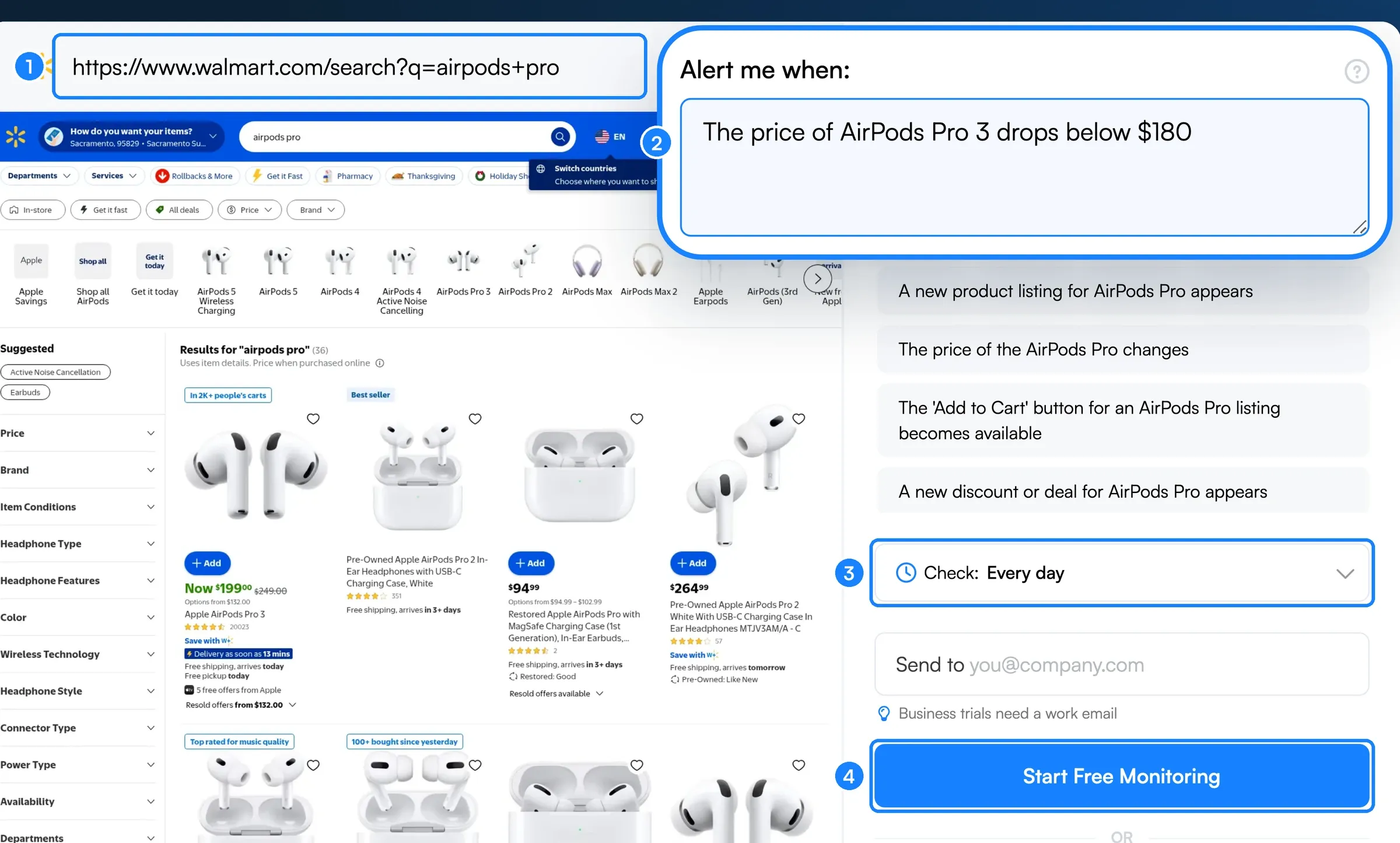 Setting up a price drop alert on Walmart search results from the Visualping homepage.
- Copy the product URL you want to monitor.
- Paste it into Visualping and confirm that the preview shows the correct product, variant and price.
- In the “Alert me when” box, pick an AI suggestion or write a specific condition, such as “this product’s price drops below $100.”
- Choose a cloud check interval available on your plan and within your monthly allowance.
- Enter your email in the “Send to” field and click Start Free Monitoring.
This historical example compares an Amazon.ca Ninja air fryer listing captured on April 4 and April 11, 2026. The displayed summary records a price change from $184.95 to $149.99:
What makes it stand out:
- Page-based monitoring for retailer and supplier URLs whose relevant content can be captured
- Email alerts with before-and-after screenshots, an AI Summary and a binary Important flag
- Prompts for price, stock status or other captured product information
- A free plan with 5 pages and 150 checks per month; Personal 1K costs $120/year ($10/month equivalent) or $14 month to month
- Cloud monitoring continues when your browser or computer is off
2. Google Shopping price tracking
Google lets signed-in users track eligible products from a product card in Search. Where available, you can select a target price and receive email and Google app notifications when the price drops below it.
Strengths:
- Built into Google
- Price comparison across retailers
- Price history and high, low or typical price context for supported products
Limitations:
- Availability varies by country, device and Google surface
- Check whether the product card offers tracking for your selected size or color
- Google’s public instructions do not specify a guaranteed detection or notification interval
3. CamelCamelCamel (Amazon-only)
CamelCamelCamel is a free Amazon price tracker with price-history charts for millions of Amazon products and email alerts based on a target price.
Strengths:
- Price-history charts for tracked Amazon products
- Custom price thresholds for email alerts
- Separate Amazon, third-party new and third-party used price types
Limitations:
- Coverage is limited to supported Amazon locales and products
- Check the current price and availability on Amazon before buying
- Choose the price type that matches the offer you want to follow
4. Honey / PayPal (Droplist and coupons)
Honey’s free browser extension tests available coupon codes at checkout on supported sites. Its account-based Droplist tracks eligible items and sends email when it detects the price-drop amount or percentage you choose.
Strengths:
- Coupon testing on supported sites
- Documented Amazon price history for US members
- Configurable Droplist thresholds
- Tracking across all available stores for eligible items, with saved items managed in one Droplist
Limitations:
- Droplist is available only on supported sites and items
- Honey documents watch periods of 30, 60, 90 or 120 days; check your selected watch period and the item’s availability when it expires
- Droplist’s price-drop calculation excludes shipping, taxes and other additional costs
5. Retailer apps and built-in wishlists
Check the tools offered by the retailer you use. Amazon, for example, lets app users opt into push notifications for price drops or deals on items in Lists. Amazon also documents target-price alerts and price-history features, with availability depending on the market and product.
Strengths:
- Tracking and shopping within the retailer’s own tools
- Amazon offers price history on eligible listings
Limitations:
- Features, history coverage and notification settings vary by retailer
- Check the selected item, variant and notification settings before relying on an alert
- Compare other stores separately when the retailer’s tool covers only its own offers
Price drop tracking software compared
| Feature | Visualping | Google Shopping | CamelCamelCamel | Honey | Retailer apps |
|---|---|---|---|---|---|
| Retailer coverage | Pages whose relevant content can be captured | Eligible product cards and stores | Supported Amazon locales and products | Supported stores and items | Varies by app |
| Price history | Recorded change snapshots | History for eligible products | Amazon price-history charts | Documented Amazon history for US members | Varies; Amazon offers history |
| Custom price condition | AI prompt, such as “below $100” | Target price where available | Target-price email alerts | Drop amount or percentage | Varies; Amazon offers target prices |
| Ongoing tracking | Scheduled cloud checks | Account notifications | Email price watches | Account-based Droplist | Varies by app |
| Alert context | Before-and-after screenshots and AI Summary | Product price updates | Email alert; history charts on site | Price-drop email | Varies by app |
| Stock and availability | Prompt about captured availability information | Check the feature offered for the item | Availability data; confirm on Amazon | Droplist focuses on price | Check the feature offered for the item |
| Multi-retailer tracking | Separate monitor for each retailer URL | Supported retailers | Amazon only | Eligible items across available stores | Check each app’s coverage |
| Free option | 5 pages, 150 cloud checks per month | Built-in price tracking | Free price tracker | Free extension and Droplist | Check the retailer’s terms |
Retailer apps are a category, so their capabilities vary. The comparison reflects public documentation checked October 27, 2026.
How to track price drops with Visualping
Start with a product URL and confirm that Visualping can capture the price you want to monitor.
Step 1. Open Visualping, create an account or sign in, then choose Start monitoring in your dashboard. Paste the product URL and click Go.
Step 2. Confirm that the preview shows the correct product, seller, variant and price. If selecting a variant or closing a popup requires Actions, configure those first and recheck the preview. Then write an “Alert me when” condition, such as “The price of this item drops below $100,” or pick one of the AI suggestions.
Step 3. Choose a cloud interval your plan supports. Free permits hourly checks, Personal 1K permits 15-minute checks, and Personal 5K permits 5-minute checks. Each also has a monthly check allowance, so use the budget examples below before selecting a continuous schedule.
Step 4. Complete any remaining setup prompts and confirm that email notifications are enabled. For alerts filtered by your price condition, confirm that “Alert me only when the AI condition is met” is enabled.
Cloud monitors run on Visualping’s servers. After a scheduled check detects a matching change, the email alert shows a before-and-after comparison and AI Summary. Open the product page to confirm the current price and availability before purchasing.
The same monitoring steps also work on a filtered real estate search if you want real estate listing alerts for new listings and price drops.
Plan the check budget across your watchlist
A plan’s shortest interval and its monthly check allowance are separate limits. For continuous cloud monitoring over 30 days, the calculation is pages × checks per day × 30:
| Example schedule | Checks over 30 days | Relevant monthly allowance |
|---|---|---|
| 5 pages, once daily | 150 | Free: 150 |
| 1 page, every 15 minutes | 2,880 | Personal 1K: 1,000 |
| 1 page, every 5 minutes | 8,640 | Personal 5K: 5,000 |
These examples count scheduled checks only. Additional checks use the same allowance. The last two schedules exceed those plans’ included allowances if run continuously for 30 days. Use a slower schedule, a shorter monitoring period or a plan with enough checks. All cloud monitors share the plan’s check allowance. Monitoring pauses when the allowance runs out. Check current plan limits before scheduling your watchlist.
Best practices for price drop alerts
Match check frequency to your budget. Use a daily schedule for items you can wait for. If you choose more frequent checks for a sale, confirm that your plan supports the interval and has enough checks for the period you want to cover. A short interval still cannot guarantee that an offer remains available when you open the alert.
Check price history before acting. Compare the current offer with earlier prices for the same item and seller. In our 2025 Black Friday tracking, Travel and Games & Hobbies had the highest share of deals that were cheaper earlier in the season, at 43%.
Track the same product across retailers. Set up a separate monitor for each retailer URL. Compare the same variant and condition, then review shipping, taxes and the final checkout total before deciding where to buy.
Combine price alerts with stock checks. To monitor both, make sure the preview shows the price and availability. Describe both conditions in your prompt, or create a separate in-stock alert with its own page and check use. Confirm the current offer on the retailer’s page.
Frequently asked questions
What is price drop tracking software?
Price drop tracking software follows a product’s listed price and notifies you after detecting a relevant change. Compare each tool’s supported stores, check schedule, alert conditions and notification format before choosing one.
Does price drop tracking software work on any website?
Coverage depends on the tool and page. CamelCamelCamel focuses on Amazon, while Google and Honey support eligible products and retailers. Visualping checks pages you configure, subject to successful capture of the relevant content. Test the preview before relying on a monitor for a niche retailer or supplier catalog.
How often does price drop tracking software check for changes?
Check frequency varies by tool and plan. Visualping cloud checks can run as often as every 2 minutes on Personal 10K and Business plans, subject to the monthly allowance. Free has a 60-minute minimum. Google’s public price-tracking instructions do not promise a specific detection interval; check each provider’s current settings and limits.
Is price drop tracking software free?
Visualping’s free plan includes 5 pages and 150 cloud checks per month, enough for one daily check on each page over 30 days. The selectable minimum interval is 60 minutes, which uses the allowance sooner. Personal 1K costs $120/year ($10/month equivalent) or $14 month to month and includes 10 pages and 1,000 checks per month, with a 15-minute minimum interval. CamelCamelCamel and Honey’s core extension are free, and Google includes price tracking for eligible products.
Can I track prices across multiple retailers at once?
Visualping lets you create separate monitors for different retailer URLs when their content can be captured. Each monitor has its own schedule and draws from the shared cloud check allowance. Review the detected prices together. Google compares supported retailer offers, and Honey Droplist can track eligible items across available stores.
What should a price drop alert email include?
Look for the old price, new price, product link and context about the seller or variant. A screenshot helps you inspect the detected change. Open the retailer’s page to confirm the current offer before buying.
Can businesses use price drop tracking software for competitor monitoring?
Businesses can monitor captured competitor product pages and supplier catalogs with Visualping, using separate monitors and defined price conditions. For a comparison of tools for this workflow, see our guide to competitor price tracking tools.
Eric Do Couto
Eric Do Couto is the Head of Marketing at Visualping. He leads content strategy, growth operations, and brand positioning for website change detection.
More articles by Eric Do Couto