Reddit Alerts: How to Get Notified of New Subreddit Posts
By Emily Fenton
Updated November 18, 2026
TL;DR: Reddit stopped supporting RSS feeds on November 13, 2026, so feed readers no longer get new posts. To get Reddit alerts for a subreddit or a user, point a Visualping monitor at the page sorted by New. It checks on the schedule you choose and emails you when a new post matches your condition. The Free plan covers one subreddit checked every 6 hours. Reddit blocks some automated checks, so a few will fail.
What still works for Reddit alerts after RSS
According to Reddit's posts to moderators and developers, as reported by The Next Web, Reddit stopped supporting RSS feeds on November 13, 2026. It also says public API access ends in March 2027, and Old Reddit now requires a login. This is where each common route to Reddit alerts stood when we checked on November 17, 2026:
| Route | Status on November 17, 2026 |
|---|---|
RSS feeds (.rss addresses) | Ended on November 13. Our test feed for r/AskReddit came back empty, titled "Not Found". |
| Alerts for Reddit app | Still listed on the App Store and Google Play. We did not test it. Its App Store listing warns it "may need to shut down in March 2027 due to Reddit API changes." |
| IFTTT's Reddit trigger | Listed on IFTTT as "Any new post in subreddit". We did not test it. |
| Old Reddit (old.reddit.com) | Blocked our test with "You've been blocked by network security." |
| Visualping page monitor | Loaded www.reddit.com subreddit and profile pages. Some scheduled checks get blocked, as explained below. |
Visualping is our product, so weigh this guide with that in mind. If you want a push notification on your phone seconds after a post goes up, the Alerts for Reddit app sells a Premium Speed option that advertises posts "within 30 seconds of the post going live". That holds for as long as the app keeps running. A Visualping monitor sends Reddit alerts by email on a schedule (every 6 hours fits one subreddit on the Free plan) and watches one page, so it can't search all of Reddit for a keyword. The section on what happens after you click Start Free Monitoring covers what fails.
How to set up Reddit alerts with Visualping
We ran Steps 1 to 4 below on November 17, 2026, logged out, on r/buildapcsales, a community for links to products on sale. We stopped before entering an email in Step 5.
Step 1: Copy the page you want to watch, sorted by New
Open the subreddit on www.reddit.com, sort it by New, and copy the address from your browser. For r/buildapcsales that is https://www.reddit.com/r/buildapcsales/new/. To follow one person instead, open their profile, choose Posts, sort by New, and copy that address. It looks like https://www.reddit.com/user/<name>/submitted/?sort=new.
Use www.reddit.com. In our test, old.reddit.com and a Reddit search page both returned Reddit's "You've been blocked by network security" page.
Step 2: Paste the address and click Go
Paste the address into the box on the Visualping homepage and click Go. The page loads as a preview on the left, the way a logged-out visitor sees it, newest posts first.
Step 3: Tell Visualping what counts as a new post
The panel on the right asks what to "Alert me when". Click a suggestion or type your own condition. The suggestions are written from the page you loaded: on r/buildapcsales the first was "A new sales post appears on the subreddit", and on r/AskReddit it was "A new post is added to the subreddit". A narrower condition, such as "A new post with GPU in the title appears", cuts the alerts down to the deals you would act on. Visualping's AI checks each change against the condition before it emails you. The same approach works on classified listings, as in our guide to Craigslist alerts.
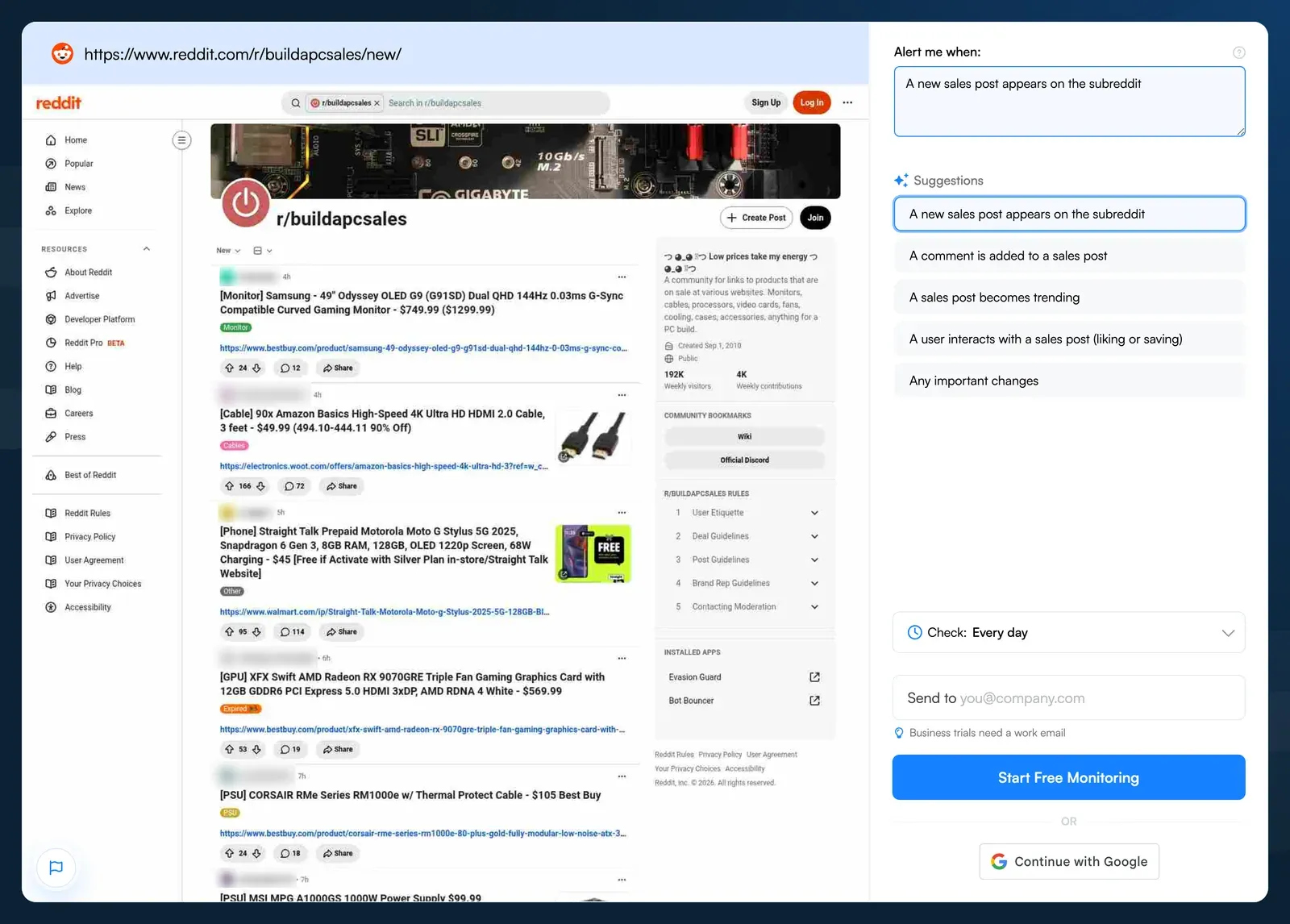
The condition is set on r/buildapcsales. Reddit usernames are blurred.
If you only care about the newest posts, hover over the preview, where it says Drag to Focus, and drag a box over the top of the list. The monitor then compares that area instead of the whole page. This step is optional, because the condition already filters what reaches your inbox.
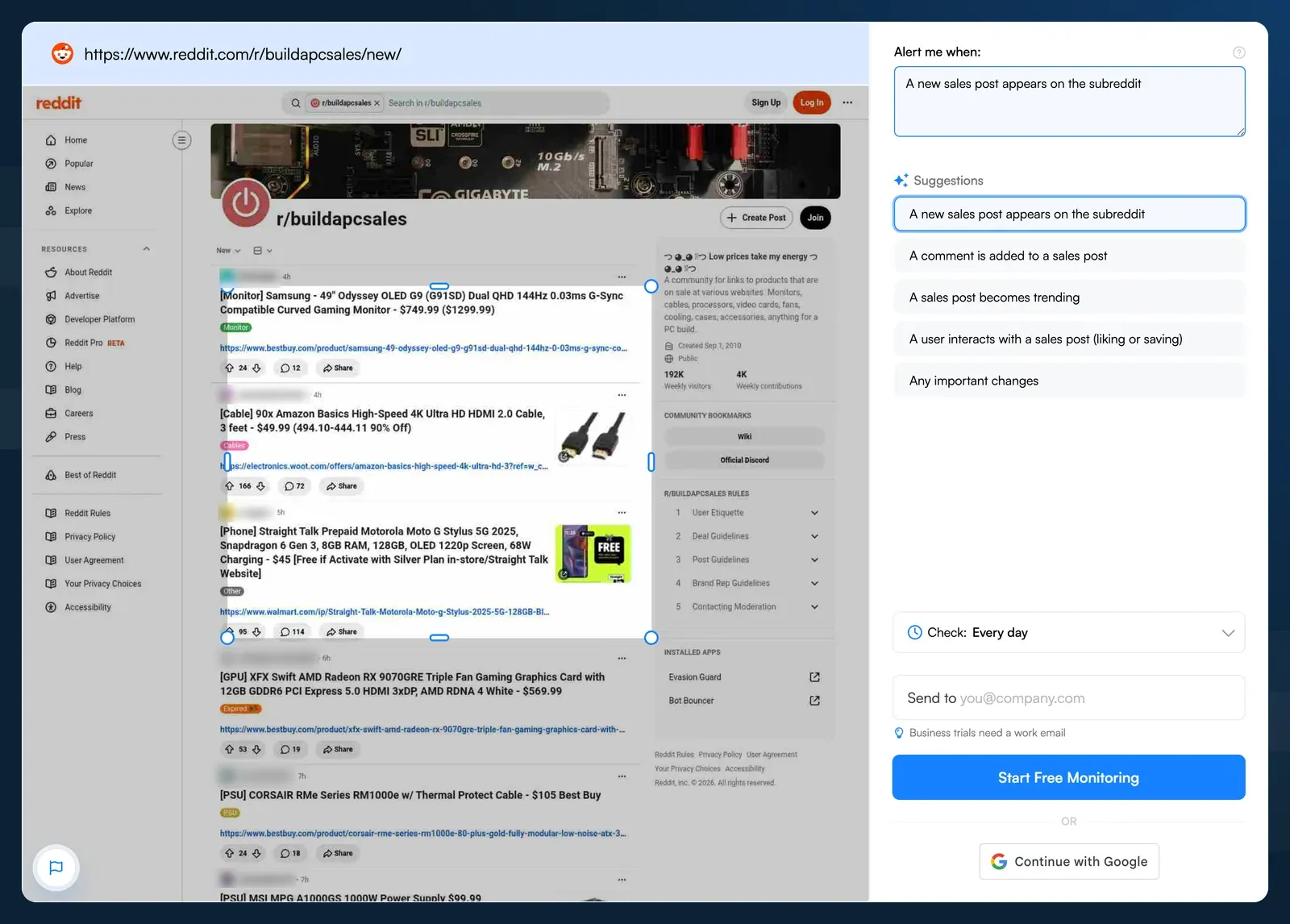
An optional Drag to Focus box over the three newest posts. Reddit usernames are blurred.
Step 4: Pick how often to check
Open the Check menu. It starts on Every day. On the Free plan, Every 6 hours fits one subreddit: that is 124 checks in a 31-day month, inside the 150 the plan includes. Hourly checks on one subreddit use 744 checks in a 31-day month, more than the Free plan's 150, and anything faster than hourly needs a paid plan. Paid plans start at $10 a month, billed annually, with 1,000 checks a month and checks as often as every 15 minutes.
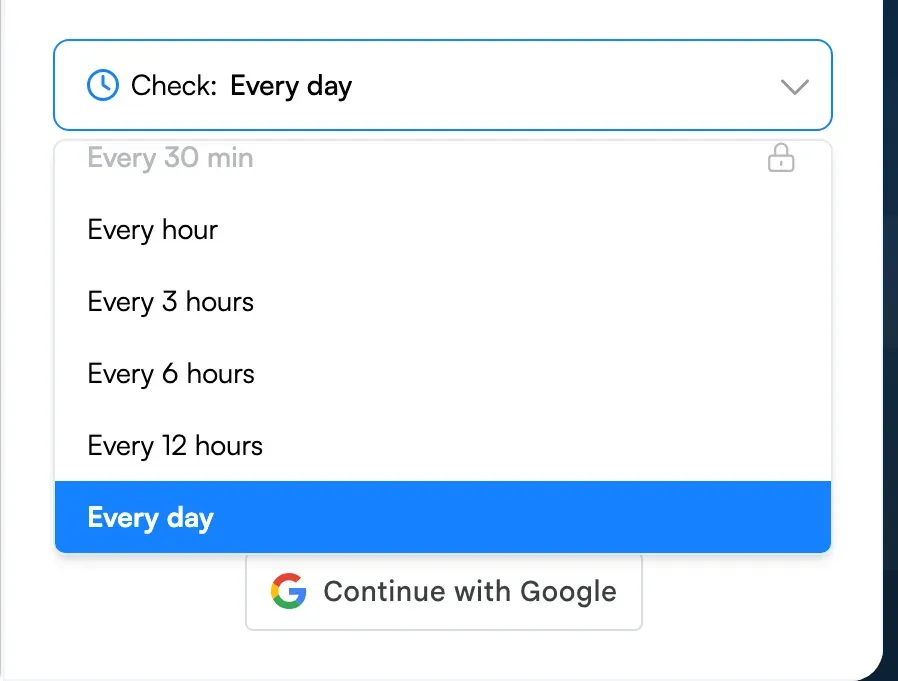
The Check menu opens on Every day. Every 30 min shows a lock.
Step 5: Add your email and click Start Free Monitoring
Type your email in the Send to box and click Start Free Monitoring, or click Continue with Google. If you typed an email, Visualping then sends a verification email to confirm the address. By default, a new monitor emails you only about changes its AI marks as important, which here means a new post that fits your condition.
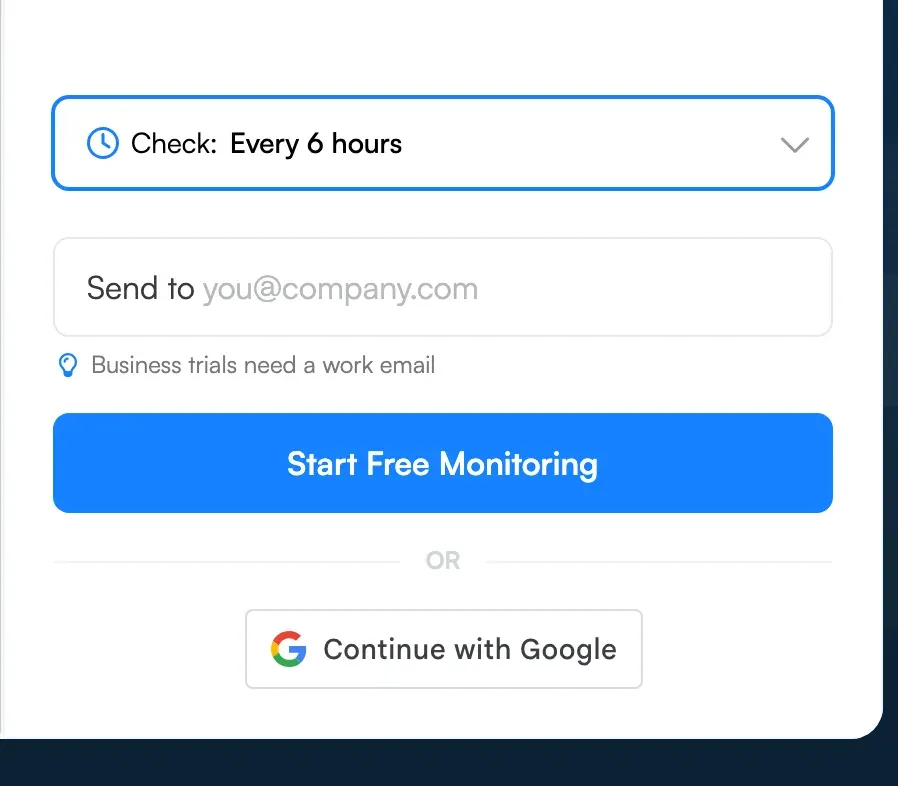
Every 6 hours is selected and the form is ready for an email address.
What happens after you click Start Free Monitoring
Visualping checks the page on your schedule and compares each check with the one before (the basics are in our guide to monitoring website changes automatically). Reddit alerts reach your inbox after the first check that sees a new post. With checks every 6 hours, an alert can arrive up to 6 hours after the post went up, or later if a check is blocked.
Reddit doesn't always let automated visitors in. When a check hits Reddit's bot wall, Visualping labels it "Bot detected", sends no change alert for that check, and still counts it against your monthly checks. Reddit also refuses some checks outright with an HTTP 403 error, and those failed checks count the same way. The next attempt is the next scheduled check. If the blocks continue, you get an error email: on a monitor that checks every 6 hours, it comes after 8 blocked checks in a row, which is two days.
In Visualping data from August 19 to November 17, 2026, the typical account monitoring a Reddit page saw 2% of its checks fail (the median across 163 accounts that ran at least 30 checks). About one in six of those accounts saw more than 10% of their checks fail. Visualping started labelling Reddit's bot wall "Bot detected" in late September 2026, and checks with that label became more common in November.
Reddit's rules on automated access
Reddit's User Agreement lists among the things users may not do: "Access, search, or collect data from the Services by any means (automated or otherwise) except as permitted" by its terms or a separate agreement with Reddit. It conditionally permits crawling in line with Reddit's robots.txt file, which on November 17, 2026 disallowed every crawler, and it prohibits scraping without Reddit's prior written consent. A page monitor visits Reddit automatically on your behalf, so read the agreement and decide whether your use fits before you set one up.
What you can monitor on Reddit with Visualping
Two kinds of Reddit page loaded in our test, and both work for Reddit alerts:
- A subreddit sorted by New, for every new post in a community
- A user's Posts tab sorted by New, for every new post from one account
They are also the two Reddit pages Visualping users watch most. Of 616 active Visualping monitors on Reddit pages on November 17, 2026, 30% watched a subreddit listing and 31% watched a user profile. Single threads made up 14% and search pages 12%. None watched an RSS address.
Search pages were the weak spot in our test. The one we tried, a Reddit search for a word sorted by New, showed Reddit's block page instead of results. To catch a word in the communities where it matters, watch those subreddits with a condition such as "A new post mentions Acme in the title". For keywords across the wider web, see our guide to setting up Google Alerts.
For deals, watch a community like r/buildapcsales, where each post links to a product on sale, with a condition such as "A new post about a GPU under $500 appears". Deals on store pages are a job for price drop tracking software.
For a brand or product, watch the subreddits where your category gets discussed and pair them with keyword monitoring on your own site.
To follow a researcher, journalist or founder who posts on Reddit, watch their Posts tab. Twitter profile monitoring covers the same job on X.
Other ways to get Reddit alerts
RSS feeds ended on November 13, 2026
This guide used to recommend RSS for Reddit alerts: add .rss to a subreddit's address and subscribe in a feed reader. Reddit stopped supporting RSS on November 13, 2026, saying RSS had become widely used for scraping. Its post to moderators said, as quoted by The Next Web, "If you use RSS for feeds outside of a community you moderate, there is no replacement." Reddit pointed moderators who use RSS for alerts to a Discord Relay app. When we loaded r/AskReddit's feed address through Visualping on November 17, it returned an empty feed titled "Not Found".
The Alerts for Reddit app
Alerts for Reddit is a third-party app on the App Store and Google Play that sends push notifications for new posts in subreddits and from users you pick, with keyword filters on titles. Its App Store listing says it is free for up to 3 alerts and needs no Reddit login, and it charges for more alerts and for Premium Speed. The same listing warns that the app "may need to shut down in March 2027 due to Reddit API changes."
IFTTT
IFTTT lists a Reddit trigger called "Any new post in subreddit", which IFTTT can pair with its Notifications service to alert you in the IFTTT app. We did not test it, and IFTTT's page does not say how Reddit's March 2027 API change will affect those Reddit alerts.
Frequently asked questions
Does Reddit still have RSS feeds?
No. Reddit stopped supporting RSS feeds on November 13, 2026, and told moderators there is no replacement for feeds outside a community they moderate. A feed address we tested on November 17 returned an empty feed titled "Not Found".
Can I get Reddit alerts by email for new posts on a subreddit?
Yes, for public subreddits that load for a logged-out visitor. Paste the subreddit's New page into Visualping, set an "Alert me when" condition such as "A new post is added to the subreddit", pick a check frequency, and enter your email. The Free plan covers 5 pages and 150 checks a month.
How often does Visualping check Reddit for new posts?
You set the frequency when you create the monitor. The Free plan checks as often as every hour, within 150 checks a month. One subreddit checked every 6 hours uses 124 checks in a 31-day month, and hourly checks would use 744. Paid plans start at $10 a month, billed annually, with 1,000 checks a month and checks as often as every 15 minutes, which covers hourly checks on one subreddit. An alert arrives after the first check that sees the new post.
Can I monitor a specific Reddit user for new posts?
Yes. Open the user's profile, choose Posts, sort by New, and paste that address into Visualping. We tested https://www.reddit.com/user/reddit/submitted/?sort=new, and the creator suggested "A new submission appears in the user's submissions section" as the condition.
Is there an app for Reddit alerts?
Alerts for Reddit, a third-party app for iPhone, iPad and Android, sends push notifications for new posts in subreddits and from users, free for up to 3 alerts. Its App Store listing warns it "may need to shut down in March 2027 due to Reddit API changes." A Visualping monitor needs no app and alerts you by email.
Why does my Reddit monitor say "Bot detected"?
Reddit served a bot wall instead of the page. Visualping marks that check "Bot detected", keeps the last good capture as the comparison point, sends no change alert, and still counts the check. The monitor tries again at its next scheduled check, and if the blocks continue, Visualping sends an error email.
Is Visualping free for Reddit monitoring?
Yes. The Free plan covers 5 pages and 150 checks a month, enough to check one subreddit every 6 hours or four subreddits once a day. Paid plans start at $10 a month, billed annually, for more pages and more frequent checks.
Emily Fenton wrote the first version of this guide. The Visualping team retested the setup up to Start Free Monitoring and rewrote it on November 17, 2026.
Emily Fenton
Emily was the Product Marketing Manager at Visualping. She has a degree in English Literature and a Masters in Management.
More articles by Emily Fenton