Grant Alerts for Funding Pages, With a Tracker Template
By Emily Fenton
Updated November 16, 2026

TL;DR: Official grant alerts cover the portal they come from. For a moved deadline, a new round or a changed eligibility rule on any other page, point a Visualping monitor at the page and write what matters in "Alert me when". Keep the list in a grant tracker that pastes into the Bulk tab.
Grants.gov sends subscribers a nightly email of federal opportunities that have been posted or modified. Most of the grant pages Visualping users watch are somewhere else. In a November 2026 sample of 2,042 active Visualping monitors on grant and funding pages, 53 were on Grants.gov. The rest sat on other sites, including agency program pages, state sites, foundations and funders outside the US. This guide sets up grant alerts for those pages and a grant tracker to keep them in order.
Jump to the part you need:
| If you want to | Go to |
|---|---|
| See which official alerts exist and what they miss | Which grant alerts already exist |
| Decide which changes deserve an alert | Grant page changes worth an alert |
| Put an alert on one grant page | Set up a grant alert |
| Organize a list of programs and deadlines | Keep the list in a grant tracker |
| Size a plan for your list | How many pages and checks a grant watchlist needs |
| See what page monitoring cannot do | Where page monitoring stops |
| Find quick answers | Frequently asked questions |
Which grant alerts already exist and where they stop
Check for an official alert before you build your own. Each one has a boundary. We read these three on their official pages on 16 November 2026.
| Official alert | What it sends | Where it stops |
|---|---|---|
| Grants.gov subscriptions (US federal) | A nightly email of opportunities posted or modified, once you have an account. You choose all new opportunities, saved searches or selected opportunities. | It covers opportunities listed on Grants.gov. The saved-search option does not notify you when an opportunity package changes, such as modified application forms. For that, subscribe to the selected opportunity. |
| California Grants Portal updates (US state) | A daily or weekly email of newly added grant opportunities in the categories you pick. Energy is one of them. | It announces opportunities newly added to the portal, which lists grants and loans from California state agencies. The sign-up page makes no mention of changes to listings you already follow. |
| UKRI funding finder (UK research) | An RSS feed of funding opportunities. UKRI's email list covers funding, news and events, with a weekly newsletter. | It covers UKRI's own funding: its seven research councils, Research England and Innovate UK. For a funder outside UKRI, look on that funder's own site. |
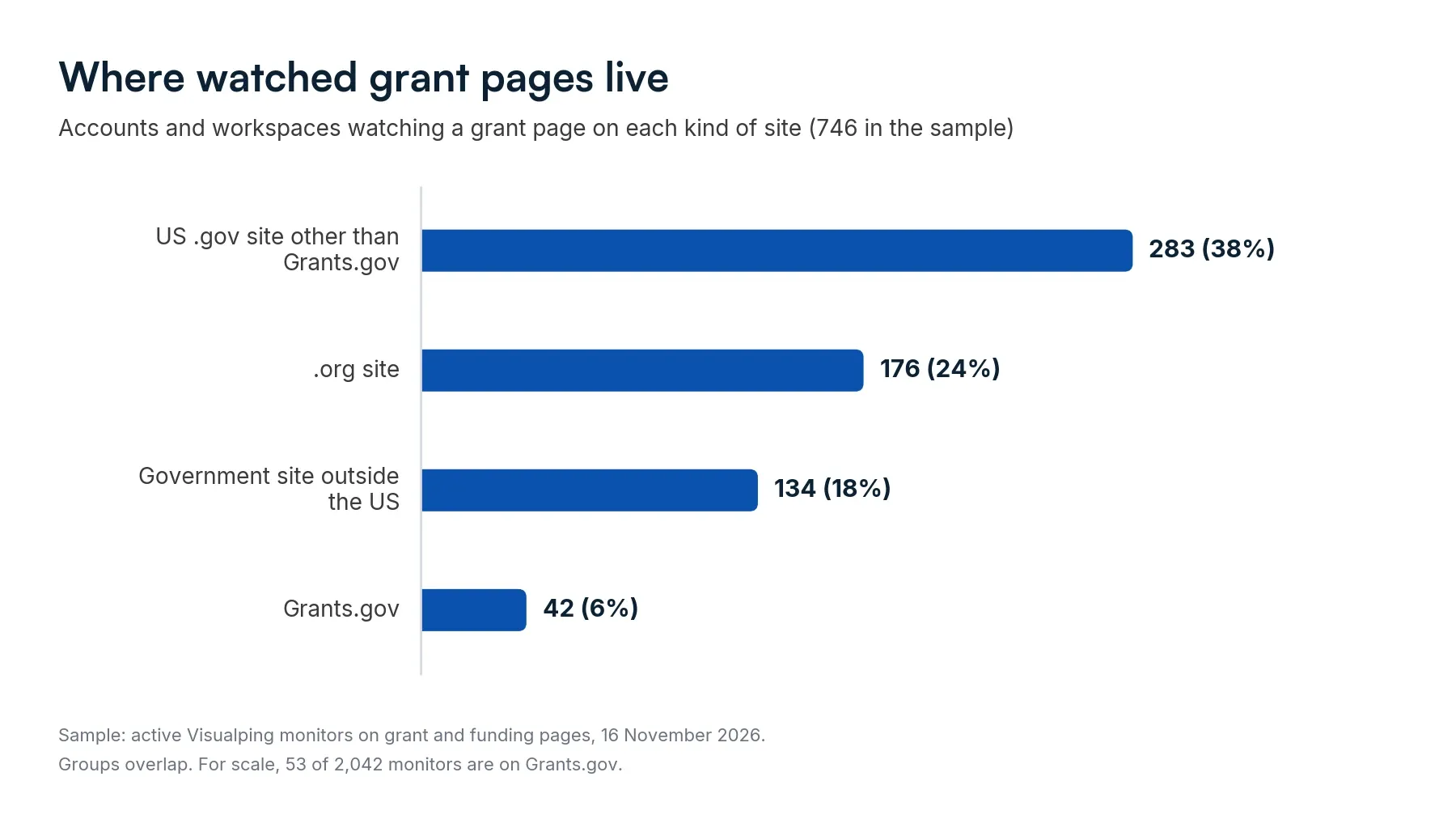
For every other funder, you are back to the page itself. The same sample covers 746 accounts and workspaces. Of those, 283 watch a grant page on a US .gov site other than Grants.gov, 176 watch one on a .org site, and 134 watch one on a government site outside the US. The groups overlap.
Grant page changes worth an alert
In our sample, 59% of long-running monitors on grant pages recorded a change in the past 90 days, and 37% in the past 30. The sample is 1,134 monitors that had watched a grant or funding page for at least 90 days and were still checking it in November 2026. Every detected change counts, down to a small layout edit. People also choose pages they expect to change, so the figure describes watched pages only. Decide which changes matter before you set the alert.
| Page | The change to catch | What you do next |
|---|---|---|
| Program page | A deadline that moves, in either direction | Reset your internal dates the same day |
| Eligibility or guidance section | Applicant types added or removed | Recheck whether your organization still fits |
| Funding amounts | A new award ceiling or total budget | Revisit the size of your request |
| Rounds or calls list | A new round, call or intake | Start the application calendar |
| Application guide or form | A new version of the document | Compare it with the version you are working from |
| Awardee list | New recipients | Note who was funded, and for what |
A round can also open with a shorter window than usual. On 1 May 2026, the CDC's World Trade Center Health Program told researchers that the publication date of its fiscal year 2026 funding notices was uncertain. If the notices were issued in time, it said, the application period would be approximately 45 days or less.
The same list works for public energy and building grants. If you install solar, batteries or insulation, watch your government's energy grant pages and ask for an alert when a new scheme or grant is added. For research funding, watch the funder's call list and ask for an alert when a new call is listed.
An association that hunts for financing for its member organizations has the same job with a longer list. The tracker further down handles that list.
Set up a grant alert in Visualping
Add the page
In the monitor creator, choose the Single tab and paste the page URL. If you do not have the URL yet, the Discovery tab suggests public pages from a description such as "state energy efficiency grant programs".
Say which changes count
Write the condition in "Alert me when". The important alerts playbook has more ways to phrase one. A condition to start from:
Alert me when the application deadline changes, a new funding round or call is announced, eligibility criteria change, or the award amount changes. Ignore navigation, banners and footer dates.
Visualping AI checks each detected change against that condition, and the alert email carries a summary of what changed. On a long page, you can draw an area around the section that holds the deadlines so the check covers that part of the page. The area is a fixed rectangle, so redraw it if the page layout shifts.
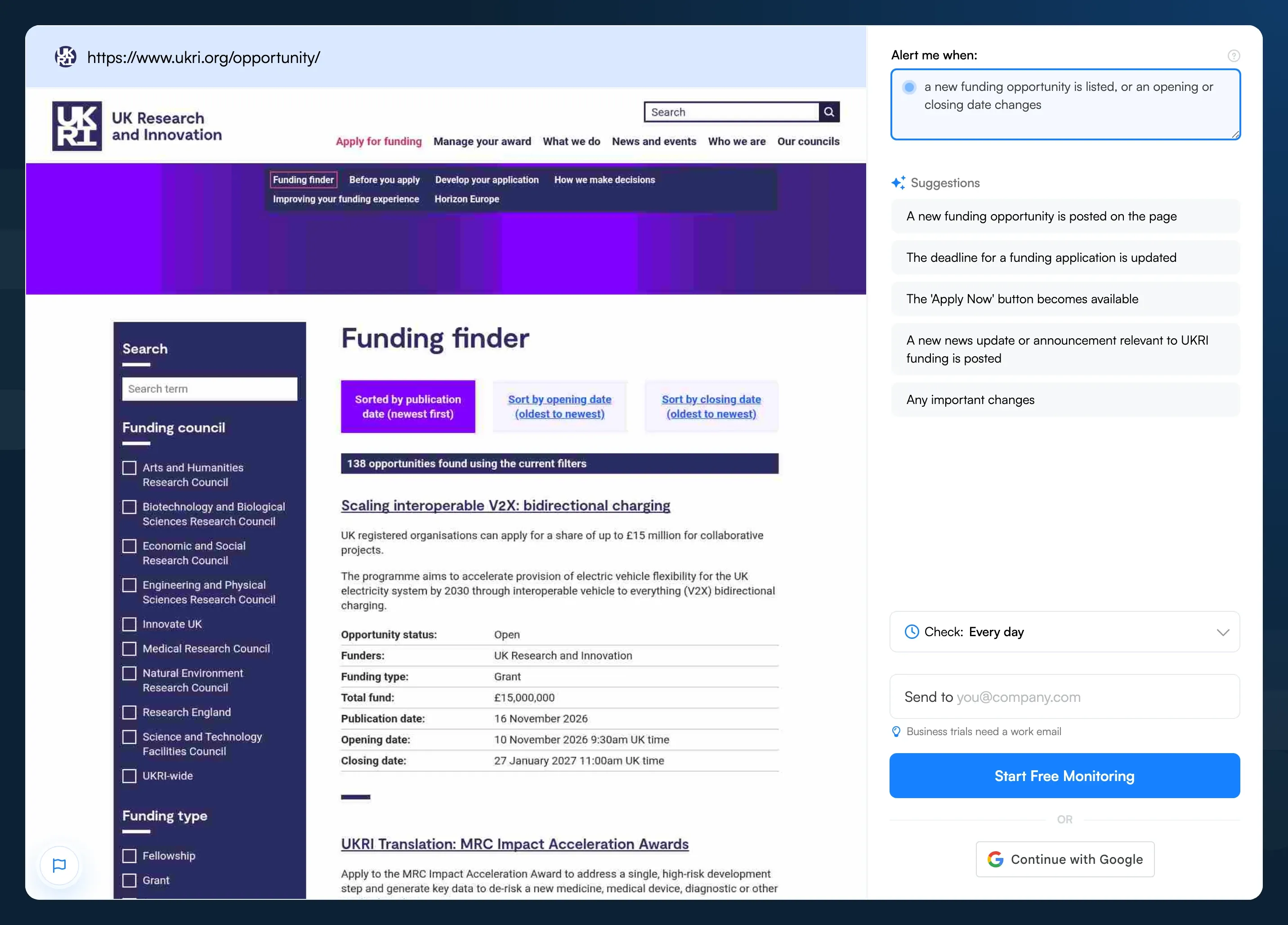 The same step on the Visualping homepage, with UKRI's funding finder loaded.
Pick a check frequency
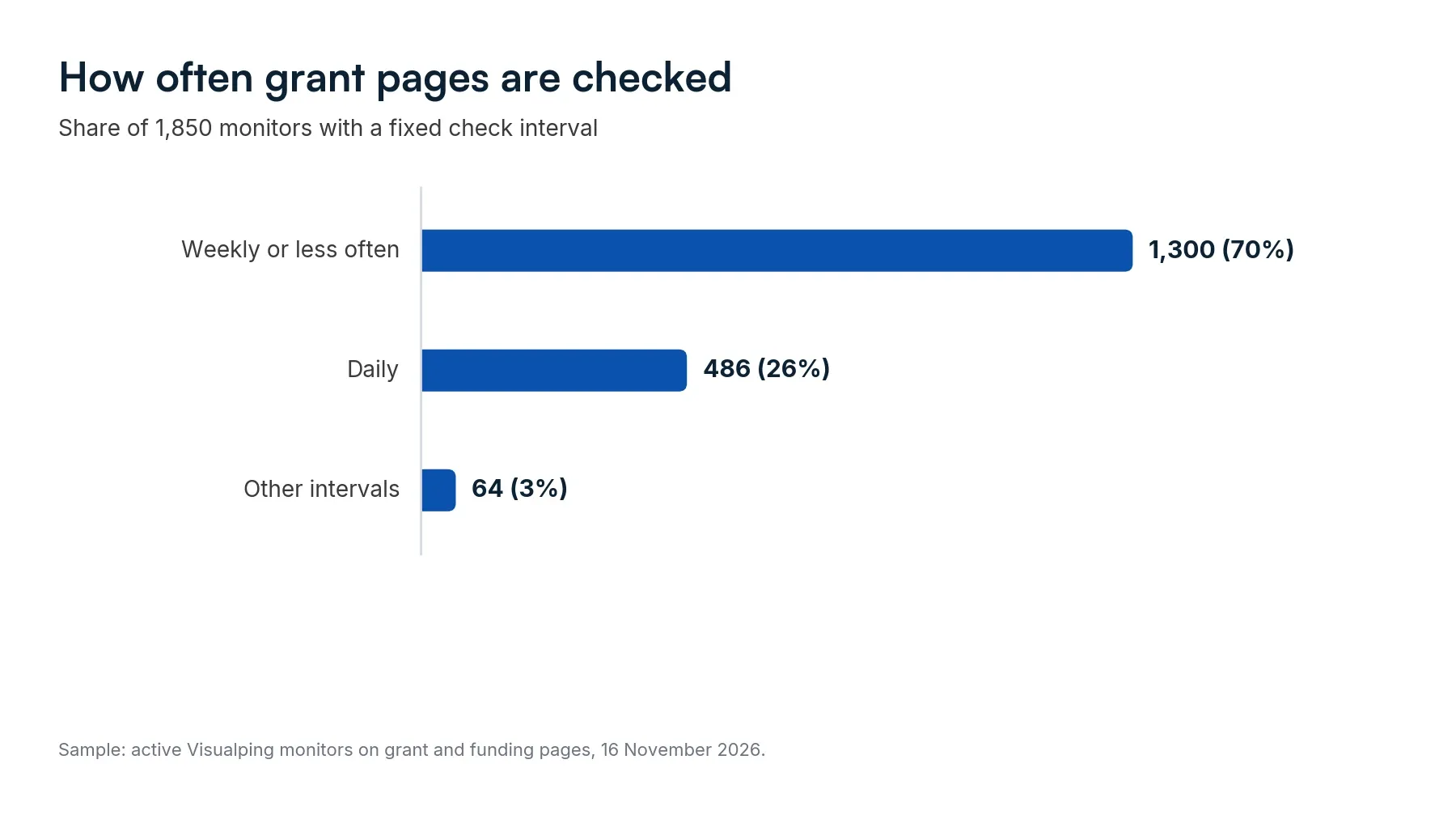
Daily suits a page with an open deadline. Weekly or monthly suits a program page between rounds. Of 1,850 monitors on grant and funding pages with a fixed check interval in November 2026, 70% were set to check weekly or less often, and 26% daily. Plan limits shape those settings, so read the figures as what is common.
Faster checks exist if a page needs them. Options run from every 2 minutes to monthly, and the fastest setting depends on the plan: 60 minutes on Free, 15 on Personal 1K, 5 on Personal 5K, and 2 on Personal 10K and Business.
Send the alert to the right inbox
Email is on by default. A second reader in CC needs Personal 5K or above, and Slack or Microsoft Teams channels need a Business plan. Webhooks, on every plan, carry the alert into other systems such as Zapier or n8n.
Track the PDF behind the page
When the rules live in a PDF, the program page can stay the same while the guide changes. Monitor the PDF's own URL, or the page that links to it when the file name changes with each version. Our guide to monitoring online PDFs covers both routes.
Keep the list in a grant tracker
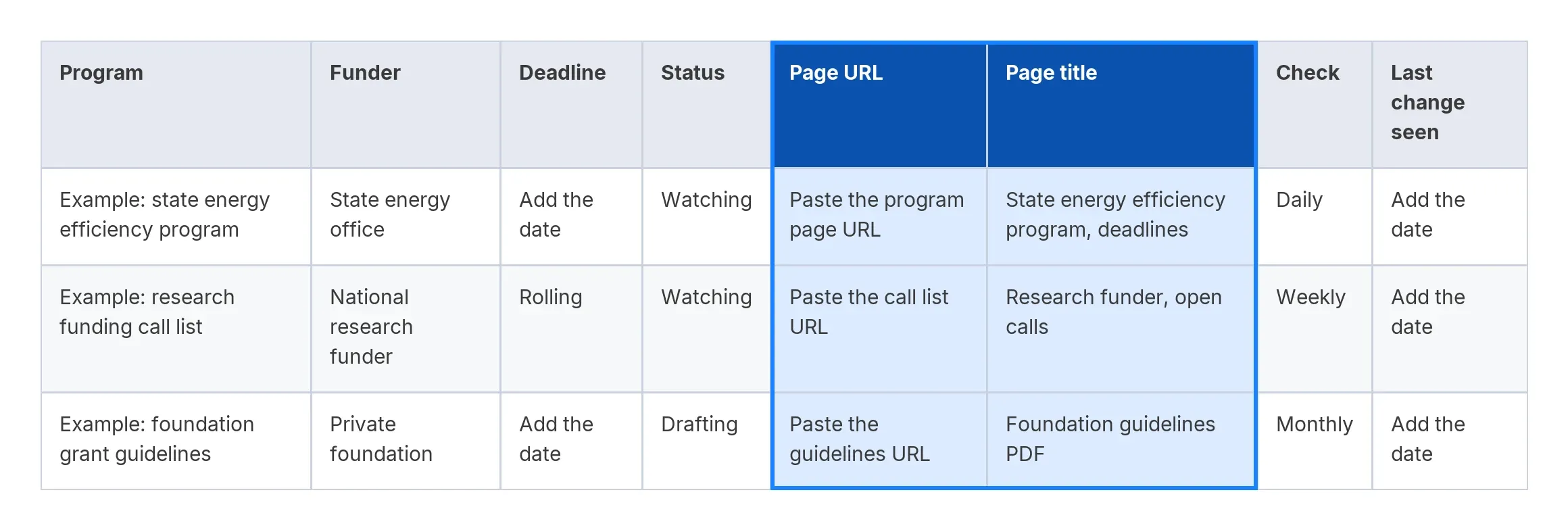
A grant tracker is a table of the programs you follow: funder, deadline, status and the page where the funder publishes each program. For grant tracking, a spreadsheet is enough. This grant tracker template adds two columns, the page URL and a page title, so you can paste the same list into Visualping.

| Program | Funder | Deadline | Status | Page URL | Page title | Check | Last change seen |
|---|---|---|---|---|---|---|---|
| Example: state energy efficiency program | State energy office | Add the date | Watching | Paste the program page URL | State energy efficiency program, deadlines | Daily | Add the date |
| Example: research funding call list | National research funder | Rolling | Watching | Paste the call list URL | Research funder, open calls | Weekly | Add the date |
| Example: foundation grant guidelines | Private foundation | Add the date | Drafting | Paste the guidelines URL | Foundation guidelines PDF | Monthly | Add the date |
Download the grant tracker template as a spreadsheet (XLSX). It opens in Excel and Google Sheets.
To turn the tracker into monitors, copy the Page URL and Page title columns, open the Bulk tab and paste. Phones do not show the Bulk tab. The guide to bulk URL monitoring covers the import in detail. Each row becomes a monitor with the settings you chose in the creator, so paste rows that share a check frequency together. Bulk-created monitors watch the full page, their fastest check interval is 15 minutes, and an import cannot go over your plan's page limit (5 on Free).
On a Business plan, label each monitor by funder or program so you can filter the dashboard the same way you sort the tracker. The Google Sheets integration, also on Business, adds each alert as a new row in a sheet you choose.
How many pages and checks a grant watchlist needs
In a 31-day month, a page checked daily uses 31 checks and a page checked weekly about 4.4. A failed check counts too. The plan limits below are from the pricing page, read on 16 November 2026.
| Watchlist | Checks a month | Smallest plan that fits |
|---|---|---|
| 5 pages, 4 checked daily and 1 weekly | About 130 | Free (5 pages, 150 checks) |
| 10 pages, checked daily | 310 | Personal 1K (10 pages, 1,000 checks) |
| 20 pages, checked daily | 620 | Personal 5K (20 pages, 5,000 checks) |
| 40 pages, 10 daily and 30 weekly | About 445 | Personal 10K (40 pages, 10,000 checks) |
| 200 pages, checked weekly | About 885 | Business 20K (200 pages, 20,000 checks) |
On the paid plans, a watchlist checked daily or weekly reaches its page limit long before its check limit. On Free, five pages checked daily need 155 checks in a 31-day month, five more than the plan holds. At zero, monitors stop checking until the monthly refill, and the missed checks are not made up. Set at least one of the five to weekly.
Share grant alerts with a team
A team watchlist needs an owner for each alert. On Business, a scheduled weekly Report gathers the week's changes into one review, and workspaces separate regions or clients, each on its own plan. Business accounts can also run a Site scan on desktop. Enter a funder's website and what matters to you. The scan reads up to 250 of the site's pages once and shows which ones match, so you can pick the pages to monitor.
Where page monitoring stops
Some funder portals sit behind a login. Actions for login steps run before each check on any plan, and the creator's preview shows a tip when a page looks like a sign-in page.
For portals that use two-factor or single sign-on login, the guide to monitoring password-protected pages covers the options, including the Chrome extension.
Some sites block automated checks, and a monitor on those pages reports an error instead of a change. A check runs on a schedule, so a change that appears and disappears between two checks goes unseen.
An alert tells you that a page changed and what the change says. Whether your organization qualifies, and whether to apply, stays with you and the funder's own guidance.
Related watchlists: contracts, awards and tenders
Funders publish grants and contracts in different places. If your watchlist reaches into contracts, these guides cover the rest:
- RFP monitoring guide, for bids
- SAM.gov alerts, for US federal contract opportunities
- Government contract award alerts, for tracking who wins contracts
- List of government contract award sources, for where award data is published
- Federal procurement data system, for US federal award data
- Monitoring government agency news and guidance, for agency notices outside grants and contracts
Frequently asked questions about grant alerts
What is a grant tracker?
A grant tracker is a table of the programs you follow, with the funder, deadline, status and the page where the funder publishes each program. The one in this guide adds the page URL and a page title, so you can paste the list into Visualping and watch every page on it.
How do I get notified of new grants?
Start with the funder's own alert. Grants.gov subscriptions send a nightly email of opportunities posted or modified once you have an account, and the California Grants Portal sends newly added opportunities daily or weekly. For a funder with no alert, monitor its opportunities page and write the condition as "a new program, round or call is listed".
What is the best website to find grants?
It depends on who funds your work. Grants.gov lists US federal grant opportunities for organizations, and says federal agencies do not publish personal financial assistance there. California lists its state agencies' grants and loans on the California Grants Portal, and UKRI lists its funding opportunities on the UKRI funding finder. Foundations publish on their own sites, so a tracker keeps the whole list in one place. For student funding, see our guide to scholarship alerts.
How often should I check a grant page?
Daily for a page with an open deadline, weekly or monthly for a program between rounds. Of 1,850 Visualping monitors on grant and funding pages with a fixed check interval in November 2026, 70% were set to check weekly or less often.
Can I get an alert when an organization receives grant funding?
Yes, if the funder publishes awards on a public page. Monitor the award announcements or the awardee list and set the condition to "a new recipient is added". The same method works for contract awards.
Is this the same as grant monitoring for compliance?
No. Funders use "grant monitoring" for oversight of the grants they have awarded. The US National Science Foundation, for example, describes its advanced monitoring as including desk reviews and site visits. This guide covers the applicant's side, which is watching a funder's pages for changes before and during an application.
Is Visualping free for grant alerts?
The Free plan covers 5 pages and 150 checks a month, with checks as often as every 60 minutes. Paid plans start at $10 a month billed annually ($120 a year) for 10 pages and 1,000 checks. Slack, Microsoft Teams, labels and Reports need a Business plan. Current plans are on the pricing page.
Start with five pages
Pick the five grant pages you reopen most often. The Free plan covers five pages and 150 checks a month, enough for four pages checked daily and a fifth checked weekly. Paste the five URLs into the Bulk tab, write one "Alert me when" condition for the set, and move the rest of your list into the tracker as it grows.
Want to know when there's new info on a grant?
Sign up with Visualping to start monitoring grant web pages now.
Emily Fenton
Emily was the Product Marketing Manager at Visualping. She has a degree in English Literature and a Masters in Management.
More articles by Emily Fenton